
Bitwig Studio 6 is a major upgrade for the Berlin-based DAW with significant core feature upgrades, improvements, and more.
DAWs, or digital audio workstations, are updated frequently. The Berlin-based Bitwig Studio DAW has a 2-year major update cycle. That event is back. As a reminder, Bitwig 4 was announced in April 2023, so it’s been two years since then.
Bitwig has today unveiled Bitwig Studio 6, a major new upgrade featuring numerous core enhancements to explore.

Bitwig Studio 6
The last updates were very device-focused. For example, the modulation engine was upgraded in v5. Since the DAW is s now very extensive in terms of built-in content (synths, processors…), the developers in Bitwig Studio 6 are gain focusing on the core features and workflow.
In BS6, the developer have upgraded the automation editing with two new ways to access the automation curves. Either, you use the classic automation mode or the new detail editor panel that gives you access to all automations for any track.
Part of this new automation editing upgrade are improved gestures, making the edits quicker and more unifed, new automation behaviors like a new spread feature and improved tools, including a new algorithm that translate the free hand gesture into clean, simple curves.

Then, the new update 6.0 also introduces automation manipulation in clips. A freature known to users from audio and note clips, brings new familiar possibilities to the automation engine.
All the same clip features can be applied, such as setting looping and independent start times, sliding clip contents in time, and stretching clips. Important note: automation clips exist alongside traditional track automation.
Another handy feature is the ability to save automation clips to the library for later use.
Automation clips bring to the timeline what Bitwig Studio’s BWCURVE devices bring to instruments and effects, so the browser offers automation clips and BWCURVE files together. Dragging an automation clip onto a device will even load that shape into a Segments MSEG.
Clip Aliases & Project-Wide Key Signature
Brand new in Bitwig Studio 6 is the clip aliases feature that works with audio, note, and automtion clips in both clip launcher and arranger.
Instead of duplicating a clip across a track, the clip can be dragged as an alias. This means the clips will have a shared fingerprint, or pattern. When one clip is edited, all clips sharing that pattern will be updated, and other clip settings remain unchanged.

Also new is key signature of each BS6 project to help guide work with notes. This is a feature that is available alongside the tempo and time siguature.
The scale is visible in the piano roll and the key signature can be used to control note FX like the arpeggiator or randomize device now have a global key option. Additionally, key root note and scale can be changed across a project using automation, modulators, or project remote control
New Look & Enhanced Editors
According to the developers, they also improved the looks of Bitwig, making the interface smoother to navigate and easier to customize to specific needs.
Among other things, the editing tools are now laid out as a palette or there is a new arranger zoom option that makes a selected track or lane larger while everything else stays in place. Also the clip Launcher now visualizes the clip position and loop count for each track.
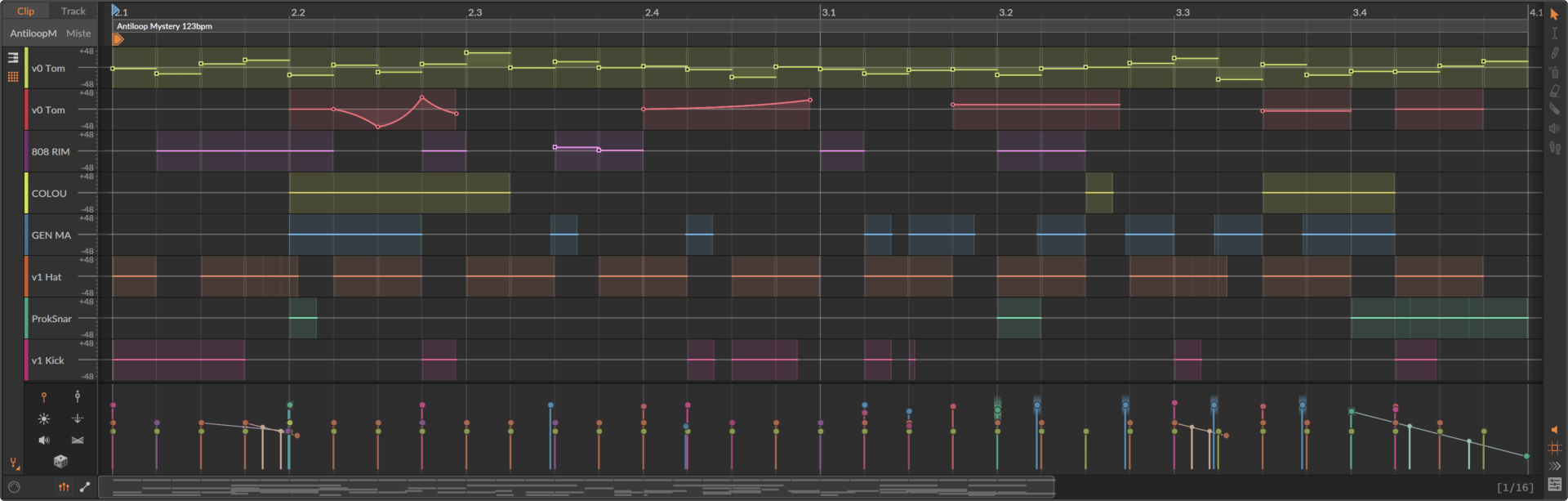
Bitwig Studio 6 also brings enhanced, expression editors. Micro-pitch curves were always shown on top of notes, but now gain, pressure, and other expressions can be edited directly on the notes (or audio) too.
All expressions are also available in the folded Drum/Hybrid editor. The new automation gestures in this update have come to expression editing as well. It’s also now easier to edit multiple clips together by simply selecting them.
Other new addition is the new audition tool to make it possible to directly preview any track or clip. You can also wor with a new setp input tool, and four new grid modules for workfing with pitch, key, and the new global key signature feature.
There is also an excellent feature that simplifies working with newer Bitwig Studiov versions. A new safety feature brings peace of mind when trying out new versions of Bitwig.
When you open a project made in a previous version of the software, a permanent backup of the original project file will be saved, with the version number noted in the name.
First Impression
A nice, comprehensive upgrade for Bitwig Studio. I’m pleased to see that they’ve focused more on the core features this time around, rather than adding another flood of devices.
It’s a shame that AUv3 plugin support for macOS/iOS apps is still missing, as is ARA, which some have requested.
Beta testing of Bitwig Studio 6 has started today. The beta is free to all Bitwig Studio, Producer, and Essentials users with an active Upgrade Plan (as of August 27, 2025).
Users will find the beta installers in their user profile. The developers aim to release it in the fall.
More information here: Bitwig
Available at my partner

Two years for this nothingburger, lol
wat u say m8, its kewl
What’d you make in the last 2 years?
Seems like it hit a bunch of the most frequently requested user wants, and completely overhauled the UI and workflow in a positive direction. This is in addition to all the 5.X updates since the last major release – it’s hard for me to imagine any serious Bitwig user being upset with this release.
I’ve been using Bitwig for about 3 years, with 5 years of Ableton and over 20 years of Cubase before that. I think this is a nice update. I just wish they would add retrospective record. I miss this feature from Ableton. I tend to just noodle around these days, and I have caught ‘lightning in a bottle’ a few times using retrospective record.