
Arturia Pigments 7: New features bring a lot of colorful character and spice to the modern flagship synth as a free update.
The year 2025 began with the NAMM coverage and a flagship synth update. In January, Arturia did it again. They have once again massively enhanced their multi-engine Synthesizer Pigments 6, including physical modeling synthesis and new filters.
No joke, the year is ending just as it began. Arturia released Pigments 7 today, another major update for its Synthesizer plugin. And yes, another free update. Certain companies could learn a thing or two from this.
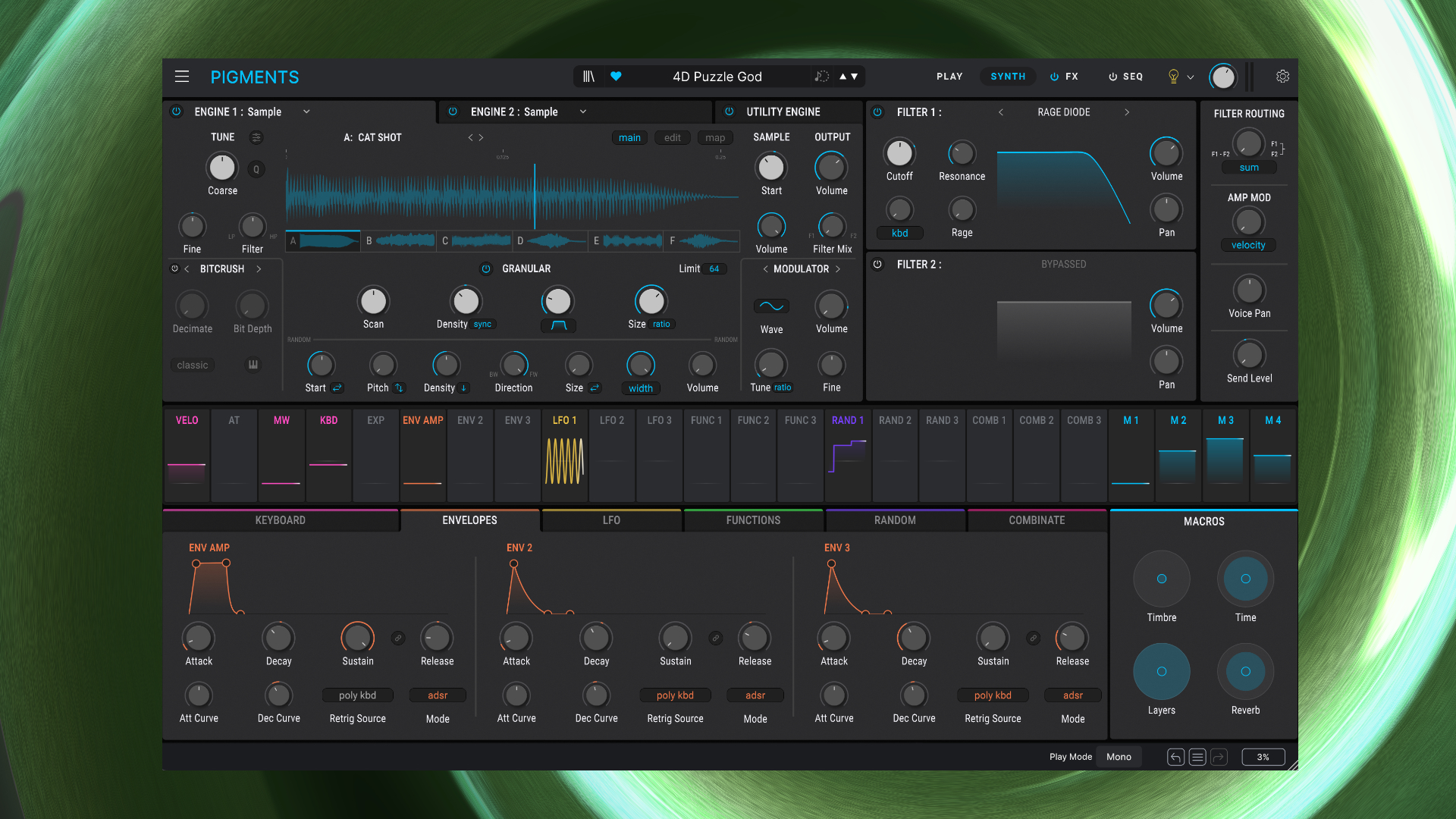
Arturia Pigments 7 Update In Short
- redesigned Play area
- 3 new distinct filter types, giving you a total of nine new filters to explore
- advanced filter FM for the classic filters
- Coroder degradation/distortion FX
- updated, snappier envelopes
- CPU optimization, more headroom for more complex sounds
- new presets, wavetables, and samples
Arturia Pigments 7 Review (In Depth)
The very first step is to go to the Arturia Software Center to download Pigments 7. That’s a matter of a few minutes, depending on your internet connection and your computer.
At first glance, you probably won’t notice any difference from the previous version. However, the changes are hidden in the details. There is a lot to discover.
Redesigned Play Section
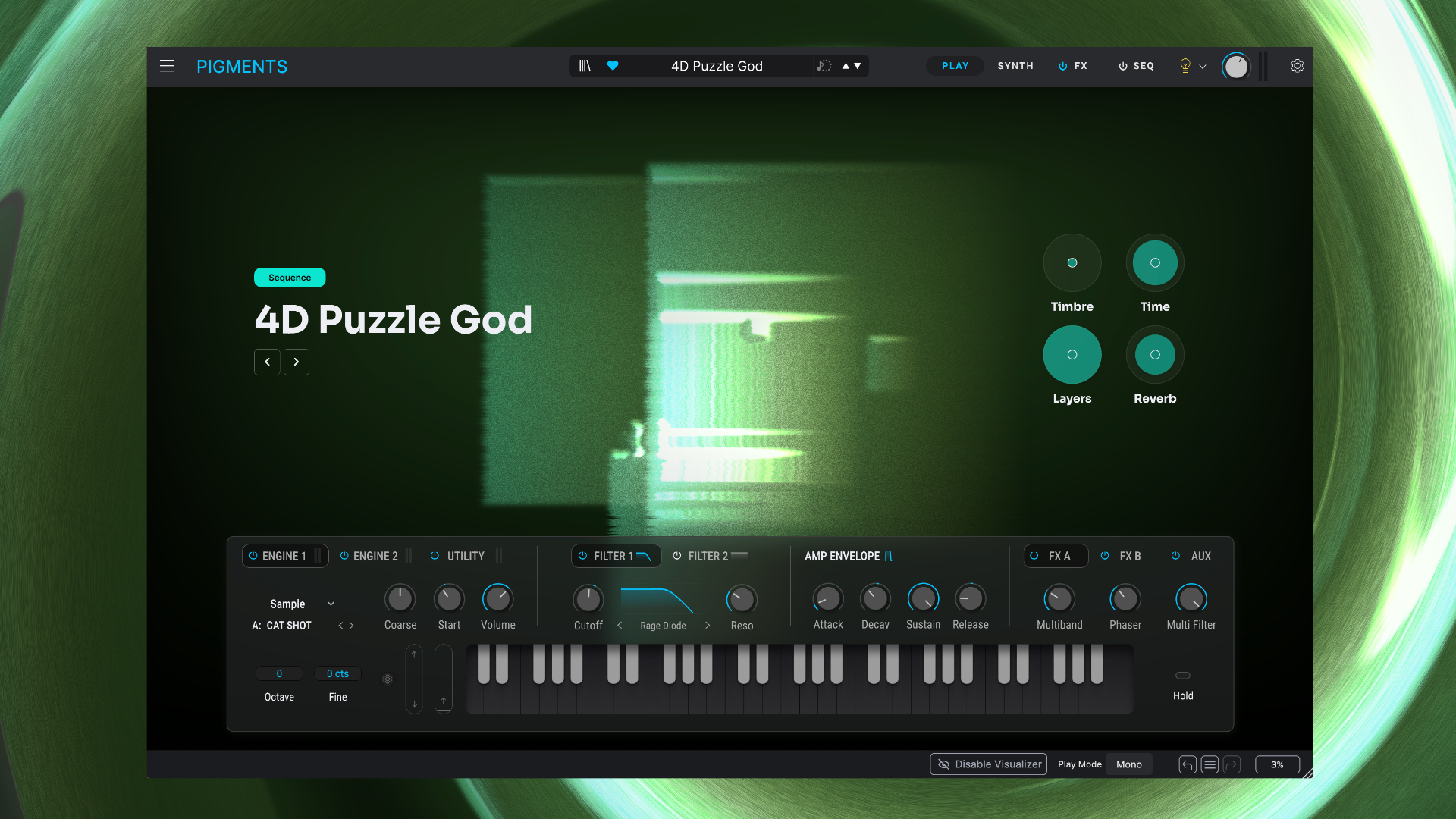
For the first one, you have to switch to the Play section, which has been completely redesigned from the ground up.
It starts with the visuals. Each patch now has a dedicated animated visualization. Don’t worry, if this gets on your nerves, you can easily turn it off in the lower part of the interface.
Then, the layout has changed. The parameters have moved to the bottom and are now presented in a much more compact format. No longer in large tiles, but nicely streamlined in a row. I like it much better than Pigments 6.
From left to right, you have a section for the oscillators (engine 1 / engine 2 / utility) with classic controls and an option to modify the sample/wavetable/waveform instantly. This allows you to quickly obtain new results without delving too deeply.
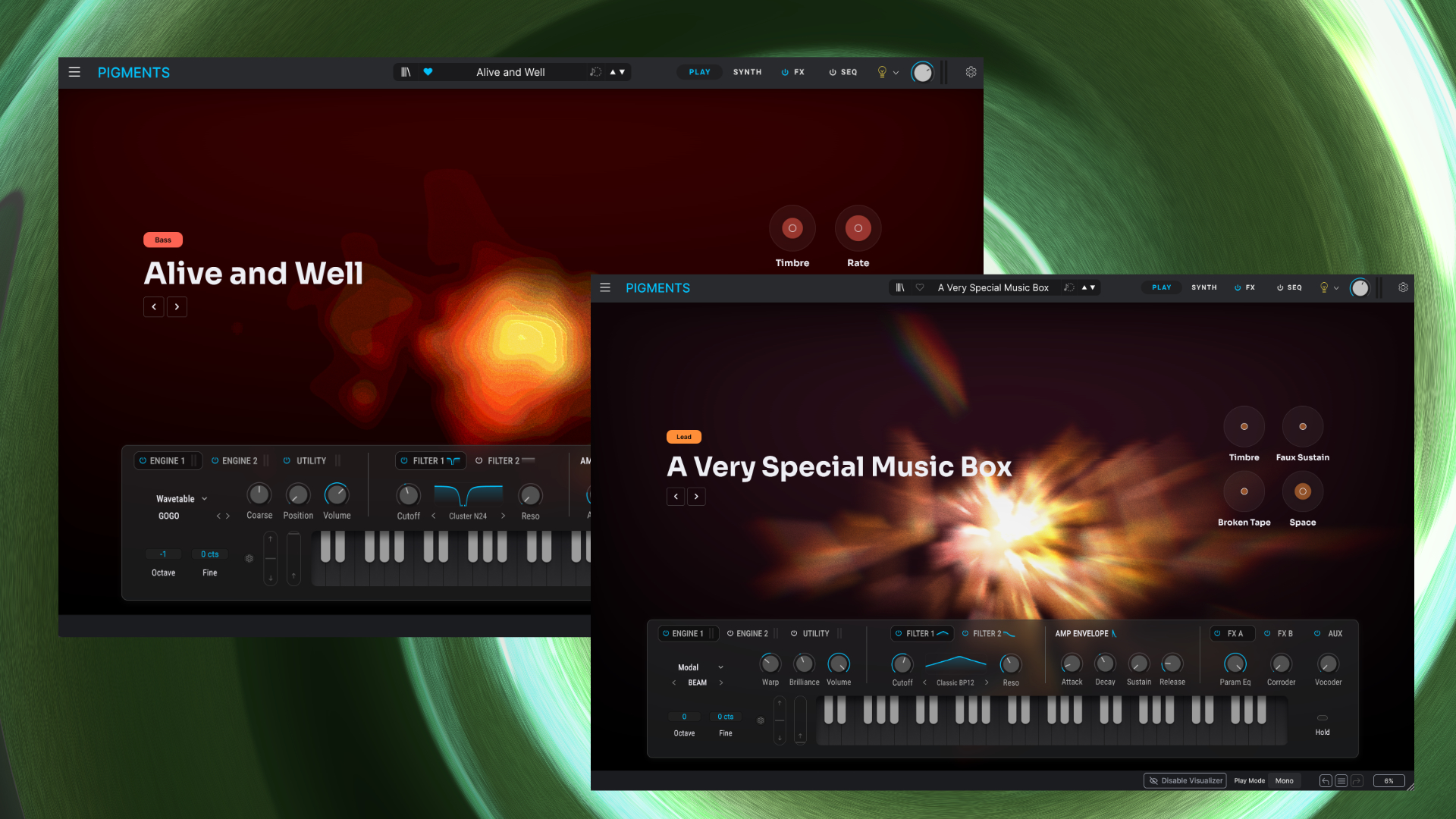
Next to this, you can tweak both filters with classic cutoff and resonance controls. It’s neat that you can change the filter type right in the Play section.
Like in the previous design, you can modify the amp ADSR envelope. The other envelopes or the LFOs still do not have access to the Play area. The FX section is still there with kinda macro controls for the FX A, FX B, and AUX buses.
The third and final part of the redesign is the repositioning of the macro controls. These are now more integrated into the interface and have also been visually redesigned. They always have a color setup that matches the active visualization.
In direct comparison, I much prefer this new one to version 6. It feels cleaner and more like a virtual instrument that you enjoy tweaking.
This allows even beginners or not-so-synth-focused musicians to quickly patch in new directions without having to access Pigment’s ever-growing arsenal of tools.
3 New Filters With 9 Flavors
Pigments 7 doesn’t feature any significant updates to the oscillators. Those were already included in Pigments 6 in January with the physical modeling/modal engine. Yes, still no multi-sample oscillator that I’m still missing.
However, there are new filters that bring new character and flavor to the multi-engine Synthesizer: Ripple, Reverb, and Rage. Adding up all the available variations, there are nine new filters to explore.
The first new filter type is called Ripple, which is designed to achieve phase-based motion for fluid movement and character. Classic types like lowpass and highpass do not exist, but it ships with three flavor intensities: subtle, medium, and hard.

Depending on the chosen intensity, you can achieve various frequency-based phase offset sounds that suits modern electronic sounds. Ripple can produce unique filtering timbres and sound a bit like you pair a phaser with a filter.
It creates overtones and makes the higher tones come to the fore. In the Ripple Hard variation, you can experience the deepest flavored version of it. The drive is delightful here, pushing everything from normal to juicy and aggressive.
Reverb: A Filter Or More Shaper?
Reverb is probably one of the most unusual filters Arturia Pigments 7 offers. It’s based on a reverb, but the result is entirely different. Arturia says it adds timbre-thickening space and weight to sounds and fits modern bass design.
I would describe it more as almost like a shaper, as it adds various new timbres to existing sounds. At low resonance, the impact is lower. Crank up the resonance, and the Reverb filter adds metallic resonance or even noisy timbres to the sound.
Things get really crazy when you mix in drive. Then we’re almost in a wall of harmonically rich distortion and noise through which you send the sounds. By adding modulation, you can create weird, experimental sound effects.
For those who found Pigments too tame and flat before, the Rage filter, based around distortion and feedback, now brings a lot of character and spice to the sound. Five distinct variations of the Rage are available: Diode, Distortion, Softclip, Tape, and Transistor.
The basic character of the Rage filter is strongly reminiscent of an Acid Filter, such as found in the Roland TB-303. It’s like having a 303 filter but on a fire overdose. At high resonance, it exhibits a similar squelch behavior where it starts screaming beautifully.

Pigments’ new filter is perfect for adding raw grittiness and bite to your sounds. Things get aggressive, brutal, and even extreme when you turn up the Rage parameter.
Here, one enters sonic territory where a TB-303 filter could only achieve this with massive distortion and feedback. Of course, it’s a perfect match for bassline and lead sounds.
My favorites here are the transistor and distortion variations, as they leave the most distinctive raw and beefy character.
9 great new filters that allow you to add a lot of character, depth, and spice to your sound design. Love them.
More Filter FM & New Corroder Distortion
That’s not all that’s new in the filters. What the other filters could already do, the Classics can now do as well. More precisely, in Pigments 7, the “Classic” filters can now achieve filter FM with the engine 1 or 2, or modulation oscillator 1 or 2.
This further expands the FM options in Pigments and enables more complex sounds.
Pigments boast a vast array of effects. Arturia has expanded this even further in Pigments 7 with a new effect processor. As with the filters, the unofficial theme of character and spice is also being followed again.

Corroder is a new distortion effect bundled with modulation that explores a different distortion direction. Anyone thinking of another classic distortion is mistaken.
Yes, distortion is possible, but Corroder leans more towards heavy degradation. It has four main adjustable parameters: frequency, bandwidth, stereo, and drive.
Things only get interesting with the mix-in noise and versatile FM options, which allow you to immerse yourself in a plethora of original degradation flavors. You can add grit, Lo-Fi, of course, distortion, and FM colorization to your sounds.
The amount knob lets you dial in this infusion of sonic destruction. Keep it low, and you get light, filtered grains in the signal like a slightly noisy signal; crank it up, and you have a sound that descends into a sump of destruction.
I loved playing around with the FM function as it generates lovely overtones, but also makes everything sound very broken. Yes, you can also take it further by modulating the parameters, but at your own risk.

More Additions
Further, Pigments 7 ships with an improved default amp envelope behavior with smoother, S-shaped envelopes that reduce clicks and deliver cleaner, harder-hitting transients.
This change becomes very noticeable when you want to design razor-sharp bass tones. A neat update that many have been asking for. Alongside this, it comes with a new visual modulation range display for easier editing and improvements on the engine core.
According to Arturia, they optimized internal processing to provide more headroom for more complex, layered, FX-heavy patches. Plus, they promise that it consumes less CPU—something I didn’t notice right away. Perhaps you see it on older computers.
Like every Pigments update, it also has new content. It ships with 150 new presets, 50 wavetables, 30 samples, and 20 noises, plus new in-app tutorials on sound design use cases.
The 150 presets offer a vast range of multifaceted sounds. While not all of them showcase the new features, some do.
Unfortunately, many patches suffer from an excessive overdose of them. But you can always reduce that or deactivate them completely, which I often do.
Arturia Pigments 7 Review Conclusion
2025 is the year of the Pigments Synthesizer. The year began with a brilliant free update and ended with another. Pigments 7 could just as easily have been called Pigments 6.5, because, as mentioned, it’s not a massive update.
Nevertheless, the developers have managed to give the multi-engine Synthesizer an additional, impressive boost with new capabilities. The new filters and the new effect add a lot of character and spice to the engine.
The fact that this is already the sixth free major update is something we can only thank Arturia for. For people who bought Pigments in 2018, it was a no-brainer anyway. I’m sure this isn’t the last update.
I hope we get multi-sample support like in Synthmaster 3 at some point, as it would take the synth to another all-in-one level. Don’t forget, all of this will also soon be available in the AstroLab ecosystem.
Arturia Pigments 7 is a free update for existing Pigments users. Pigments 7 is available now for an introductory price of 99€, down from 199€. It runs as a VST, VST3, AU, and AAX plugin on macOS (native Apple Silicon + Intel) and Windows.
More information here: Arturia
Available at my partners
Well done Arturia
Seems Arturia server are getting hit hard. Cant even login the client and when it do the license sync fails. Oh well, I’ll try later.
I also have had issues on arturia
website
servers are pretty overloaded because every users tries to access the Software Center
And again yet another significant update from Arturia Team for FREE.
Absolutely brilliant, Shame that some other companies do NOT – NI are yo listening…?
Upgrade price for Absynth is total joke…
I just found this post on KVR Forums and reposting it here because it is 100% true.
“Since the day I bought my license, every major update has been free. Not cosmetic revisions but substantial expansions that push the instrument forward in meaningful ways. In an industry where incremental upgrades often come with a price tag, this level of ongoing commitment is unusual and as someone who works in sound design, I see Pigments as more than a product. It’s a carefully evolving instrument shaped by people who clearly understand both the technical and artistic sides of synthesis. The attention to modulation, the depth of the engines, the tools for movement and generative behavior.. These aren’t features bolted on for marketing. They feel like the result of a team that actually uses the instrument and cares about what it enables.
For ambient and generative work especially, Pigments has become one of the most expressive environments available. It allows sound to unfold, breathe and behave in ways that feel intentional rather than accidental. Every update expands that without fragmenting the ecosystem or forcing users into a new purchase.
Arturia’s approach shows respect for the craft and for the people who rely on these tools every day. I appreciate that! Not just as a customer but as someone who depends on instruments that grow with me rather than reset every few years.
I haven’t explored the new features in depth yet, but based on their track record, I’m confident they will offer something of real value once again.
Thanks, Arturia. Genuinely appreciated.”
Thanks Arturia indeed…