
Review: AudioKit Pro Super J8 is the first Roland Jupiter-8 Synthesizer emulation that you can play on-the-go on your iPhone and iPad.
The Roland Jupiter-8 is a classic. It’s also a classic among plugin developers. Many companies have already released emulations of this classic polyphonic analog Synthesizer from 1981: Roland, Arturia, Cherry Audio, TAL…
Even though there are a million synths available for iOS, these users have been left out in the cold until now. But it has changed. AudioKit Pro has now released the Super J8, the first Roland Jupiter-8 emulation specifically for Apple’s mobile devices.

Thanks to Matthew Fecher from AudioKit Pro for giving me early access to the Super J8 to do this review.
Disclaimer: Since I don’t own a Roland Jupiter-8 or have the financial means to verify its authenticity, I cannot confirm or deny the app’s 100% authenticity in this review.
Comparing it to other Jupiter-8 emulations makes just as little sense, since we don’t know the conditions under which they were modeled. Furthermore, each Jupiter-8 has a slightly different character/behavior, making it even more difficult to judge.
Sorry, no hardware vs app or emulation vs emulation comparison bingo.
AudioKit Pro Super J8 Summary
Positive
- 100% synthesis no samples
- many pages, but playful, hands-on, and fun interface
- sound quality
- added features
- 600+ presets
- AUv3 support
Neutral
- authenticity vs Roland Jupiter-8 hardware and other emulations: I can’t confirm or deny
- powerful LFOs but not at audio-rate
- a VU meter in the standalone app would be handy
Negative
- odd feature placements
- not selectable noise as VCO 2
AudioKit Pro Super J8 Review
The Super J8 runs as a standalone Synthesizer app and AUv3 plugin on iPad and iPhone. Unfortunately, there’s no macOS version for Apple Silicon. For an app that will later cost $29.99 (intro $8), this would be highly desirable.
If you’re already using other AudioKit apps, the Super J8 interface will feel very familiar. It again has various sections that can be accessed via top-level tabs (JP8, VCO, FX, ENV…). With a single touch, you can quickly and easily access the GUI elements you need.

I’m more of a fan of interfaces that have everything on one page for ergonomic and workflow reasons. However, I can get used to this one, too. If you forgo the app keyboard, you have more space on the GUI for control elements.
If you’re already using a MIDI controller (yes, it does support MIDI and MIDI CC), I would always recommend going without a display keyboard. It’s more fun that way.
The interface also includes a browser with 600+ amazing, ready-to-use sounds. These were largely designed by the iOS community.
Not Classic AudioKit
Previously, most AudioKit Pro apps like VIRAL Synth T2X, or NERD Synth used a mix of sample-based oscillators and real-time synthesis. The new AudioKit Pro Super J8 is different, even though it looks like a regular AudioKit Pro app,
To emulate the sound of the Jupiter-8, the app uses 100% real-time synthesis. According to Matthew, this is the first AudioKit Pro that isn’t based on the AudioKit developer kit system. It uses only DSP code, not samples with up to 2x oversampling.

The Synthesizer structure follows 95% that of the Roland Jupiter-8, plus a few add-ons. You can play in various modes, including polyphonic and polyphonic unison with up to 64 voices (8 notes with 8 voices) and unison start sync.
Polyphonic is the classic one, but the unison mode is super fun, as it can generate a very powerful sound. Combined with the Jupiter ingredients, you get some truly epic sounds.
Jupiter-8 Voice
Super J8 has two oscillators (VCOs) with the same waveforms: sine, triangle, sawtooth, pulse, and square. Noise is not missing; it’s located in the multi-FX section and is not part of the oscillators. A bit of an odd placement.
Each oscillator has a range from 32′ to 2′ and a dedicated amp control for precise level control. There is also a one-knob mixer to set the balance between OSC 1 and OSC 2.
As with the original, both oscillators can be synced to create the legendary sync sounds. If you modulate it with the envelope via the VCO MOD section, you will hear the greatest impact. Handy, you can set if it’s modulating just the VCO 1, VCO 2, or both oscillators.
Also in the VCO MOD section, you can create pulse-width modulation sounds. You can manually control the pulse width or use the LFO or envelope to achieve pulse width modulation.

The legendary Cross-Mod, or FM, between OSC2 and OSC1 from Roland’s Jupiter-8 is also included here, with a very enticing fader. Try with the sine wave and you can hear very clear cross-mod/FM sounds.
They range from chaotic FM timbres to lovely bell sounds and everything in between. That single fader is mighty. The sounds I got from here give me Jupiter feelings; however, whether they are super close, I can’t say.
Filters
From here, it goes into the straightforward filter section. This contains modeled 12dB and 24dB low-pass filters with classic cutoff and resonance controls. Thanks to pre-wired mods, you can create envelope (1 or 2) and LFO modulations in the same section.
The 6dB non-resonant highpass filter is also available, but it’s not located in the main filter section. It’s a bit confusing at first, but over time, you learn where the HP filter is. Same for the key follow and velocity control which is not in the same section.
The Super J8’s filters proved convincing in tests. They have character and warmth. Especially at high resonance (not self-oscillating), the filter begins to show its magic, enabling heavenly filter sweeps.
I can’t judge how this compares, but to me, it sounds really creamy and beautiful

Modulation
In terms of modulation, the Roland Jupiter-8 was rather classic and modest, with just a single LFO, cross-modulation, and two envelopes. Software makes it easier to offer more. Matthew Fecher also takes advantage of this in his emulation.
AudioKit Pro Super J8 features three multi-wave LFOs. The first LFO replicates the original’s functionality, while LFOs 2 and 3 delve deeper with various modes (looping, one-shot…), unipolar (down or up)/bipolar options, depth control, and up to 60 destinations.
Besides the usual filter cutoff or PWM, you can map it to the ARP range, individual sequencer steps, effects, or even cross-modulate between LFOs – routings not possible with the original.
Each of the added LFOs can host 2 mod destinations, so you have “5 LFOs” in total. This impressive modulation flexibility has a downside, though: the LFOs don’t reach the audio rate range, so you can’t create super weird effects.
Alongside this, Super J8 features two original ADSR envelopes, including a reverse polarity option. These are, in my opinion, just as super snappy as the original, which they were known for.

Additionally, you have pitch, modwheel, and velocity control. Aftertouch or MPE modulation is completely absent, which is a shame.
Two XY pads add more movement to the sound. These can be freely assigned, just like LFO 2 and LFO 3. It would have been nice if these pads could be recorded, making them a true modulation source.
Effects
The VCA is not yet the last step in the signal path. You have controls for the volume, sub-oscillator (yes, there is a sub), and AM option. The AM has a pre-wired connection to the LFO, adding overtones to the sound.
They are not super rich, but bring a slightly broken, quirky, organic touch to the sound character. From here, it goes into a multi-FX section featuring a Juno-esque three-mode chorus, Lo-Fi, delay, two-mode reverb, and saturation.
Unfortunately, the signal path is fixed, so you are forced to use that one when using all the effects. At least there is an ON/OFF switch, which offers some flexibility.

The effects are of good quality. They’re not on a mega level like Eventide/Strymon… but they add nice extra flavors, add space and round off the sound well. Even though the Roland Jupiter 8 never had a Juno chorus, this one fits the sound very well.
Not the best chorus emulation, but in my opinion, very authentic shimmering. Not to be forgotten are the stereo width control, auto-pan, retro knob, analog pan, and compressor, which give the sound the final polish. It’s also neat to fine-tune the character and voicing.
Arpeggiator/Sequencer
The Super J8 emulation doesn’t stop at bass, leads, or passes. It also features an arpeggiator and sequencer, allowing you to craft sequenced melodic parts. Arpeggios can be programmed on the fly with four running modes and a 4-octave range.
Alongside this, you can modify the rate, the interval, and the gate of the arpeggiator. So, plucky and longer-sustained arpeggios are possible.

The sequencer also belongs more to the traditional family. Extensive feature experimentation is avoided. Adjustable up to 16 steps, rate, and gate control, and steps can be switched off.
Neat, you can select which sound source will be driven by the sequencer. This allows you to sequence specific sections, while the other remains playable normally, leading to interesting sound design.
I would have liked to see a few more playful features, like ratcheting or probability, or even different playback directions to add a bit more fun to the whole thing.
For those who use the app standalone and have nothing to do with iOS music production, there is also a built-in recorder that allows you to quickly record and export content.
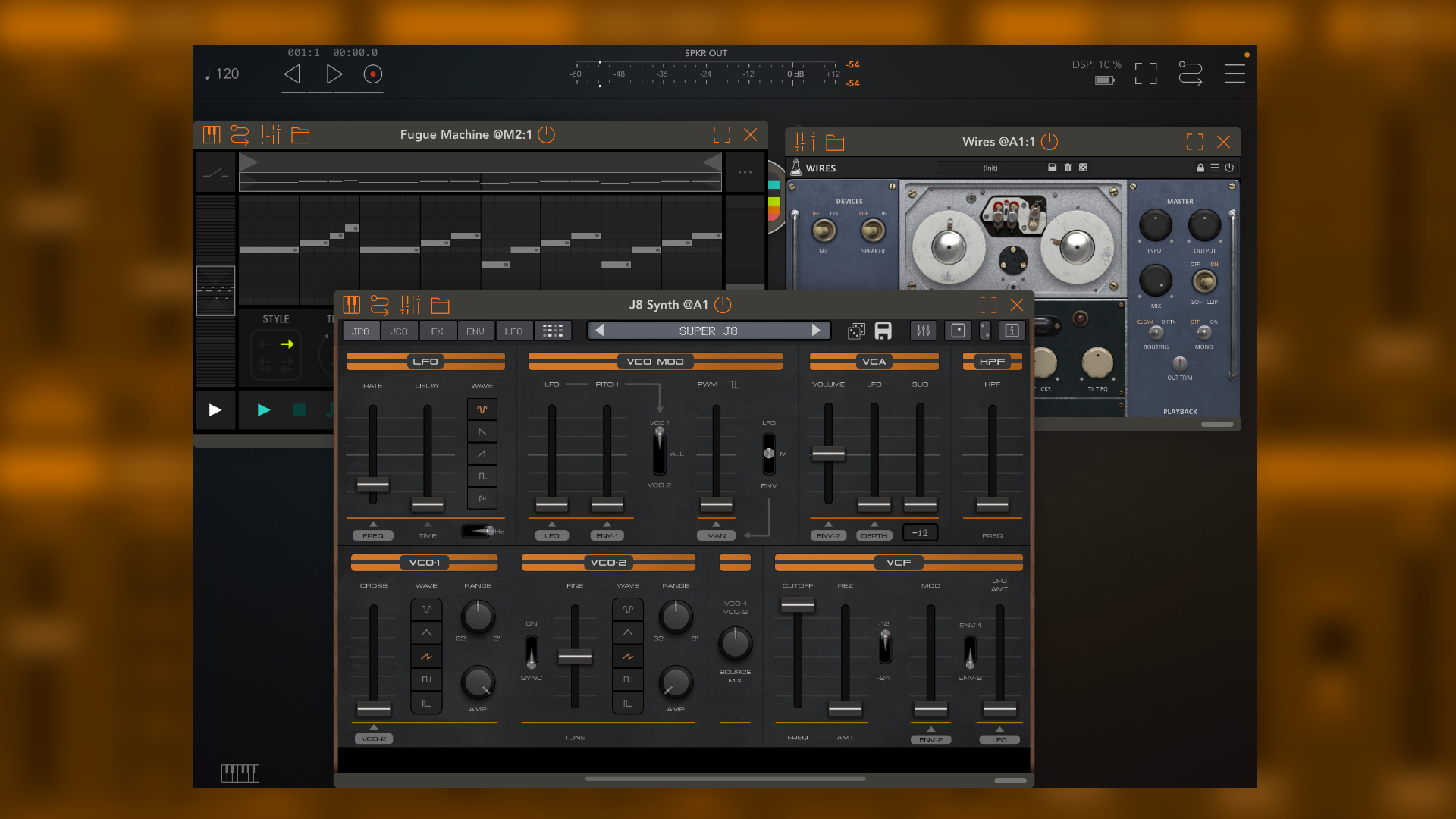
If the effects or sequencer aren’t versatile or, quality-wise, not to your taste, don’t forget that the app is also an AUv3 plugin. Turn off the sequencer and effects, and you can route through your favorite music apps.
This makes a big difference and casts the app in a completely different light. In terms of CPU performance, it’s average. Tested on a 5+ year old M1 iPad Pro. Simple patches have low CPU load, but more complex ones, such as those using Unison, can easily exceed 30%.
Audiokit Super J8 Review Conclusion
The Super J8 is a great-sounding, fun analog-modeling Synthesizer for iPad and iPhone. After two excellent Juno emulations (AudioThing, TAL), we finally have a Jupiter-8-like Synthesizer on Apple mobile devices.
The extra features added to the engine make sense and harmonize well with the authentic elements. Even though it’s not part of the original, the Juno chorus fits in quite well. It adds a bit of that Juno flair into the sounds.
Sonically, the AudioKit Pro Super J8 impresses me. It has punch, sounds rich, and produces beautiful analog-style sounds. I’m getting Jupiter vibes. For me, it’s definitely one of the top iOS apps in the analog modeling field.
I can’t judge, however, how authentic or different it is from the original. The same goes for comparisons with other emulations, which depend on many factors, such as the age of the code, the device/condition it was modeled on…
Either way, it remains a very personal impression which one you like best. Much praise for Matthew Fecher’s new app, but also some criticism. I find it a shame that the oscillator 2 section doesn’t include a noise generator. In Super J8, it’s available globally, unlike in the original.
Also, some features are located in rather odd places in the UI, requiring some searching. A macOS version is also missing and would be very welcome in the future.
All in all, an excellent Synthesizer that iPad musicians with a deep love for the Roland Jupiter-8 shouldn’t miss, especially at the introductory price. And when was the last time you could say: I have a playable Jupiter-8 in my pocket?
Audiokit Super J8 is available now for an introductory price of $7.99 instead of $29.99 until February 28, 2026. It runs as a standalone and AUv3 plugin on iOS (iPhone, iPad).


No PWM again?
there is PWM
Looks like AudioKit developers are unable or unwilling to support macOS 🙁