
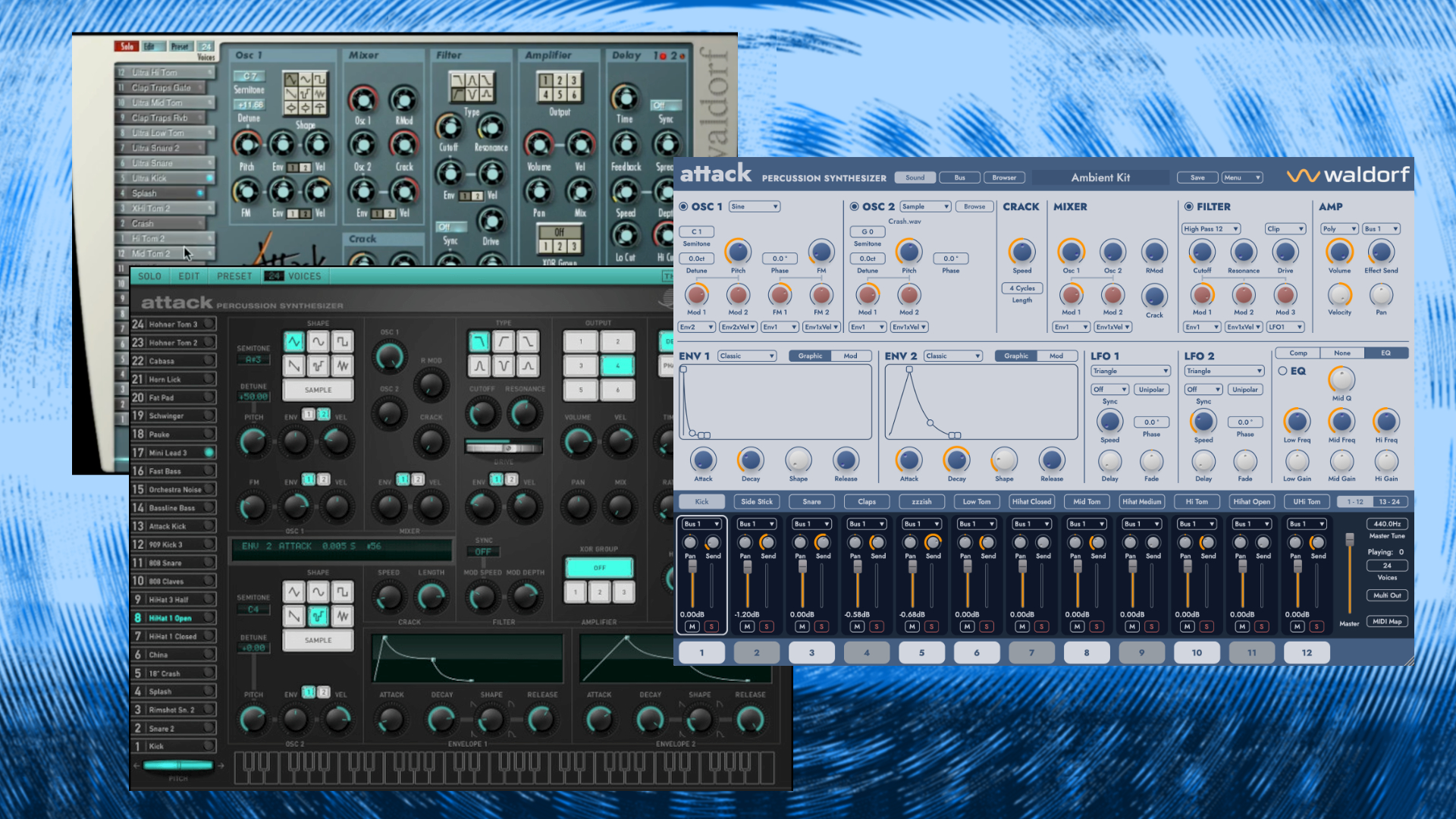
Waldorf synthesizers are directly associated with wavetables. However, over the company’s long history, they have also developed other synthesizers. For example, the Attack drum Synthesizer, which first appeared as a plugin in 2011 and later as a hardware rack unit in 2002.
Since 2015, it has lived on as a plugin bundled with the Waldorf Edition 2. After 11 years, Waldorf continues the Attack story with version 3.
Waldorf Attack 3 Review Conclusion
Pro
- standalone plugin (no longer tied to the Waldorf Edition)
- simple but intuitive user interface
- expanded hybrid engine
- sample import
- fair upgrade price
Neutral
- advantgarde synthesis options (drum algorithms…) or not?
Negative
- no built-in sequencer
- missing arrows in the main patch windows for quick patch changes
Waldorf Attack 3 Review
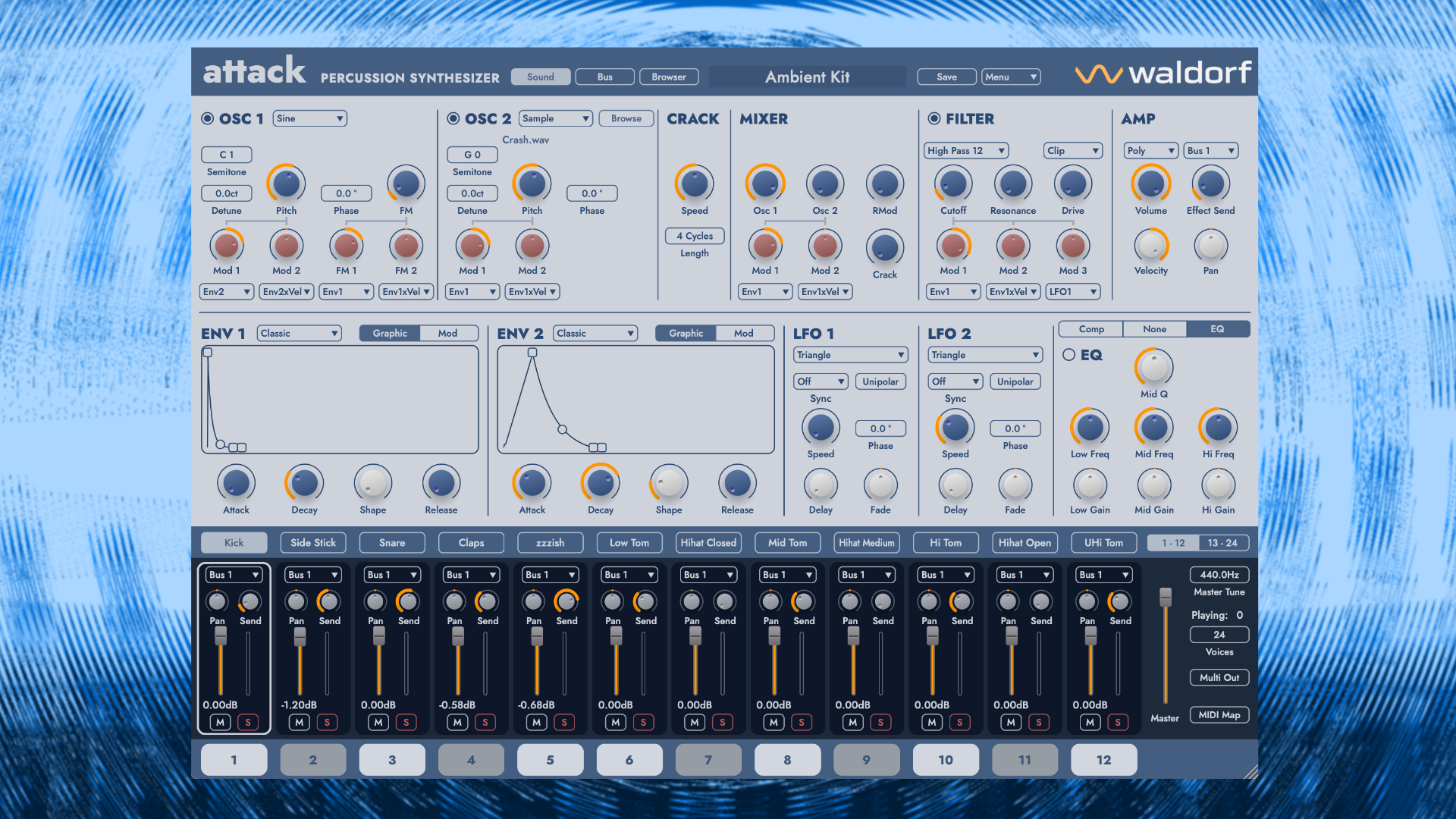
Waldorf Attack 3 is the successor to Attack 2 from 2015, which was exclusively available in the Waldorf Edition 2. It is therefore a first that this is available as a standalone plugin. It builds on this while expanding it, introducing numerous new sound design features.
Attack 3 is again a percussive Synthesizer for macOS and Windows. No, I don’t call it a drum machine because it lacks something essential to be one: a drum sequencer.
The further development or “next-gen” is already evident in the UI. In a preliminary talk with Waldorf, CEO Rolf Wöhrmann explained that they opted for the same design language as for the microwave 1 plugin.
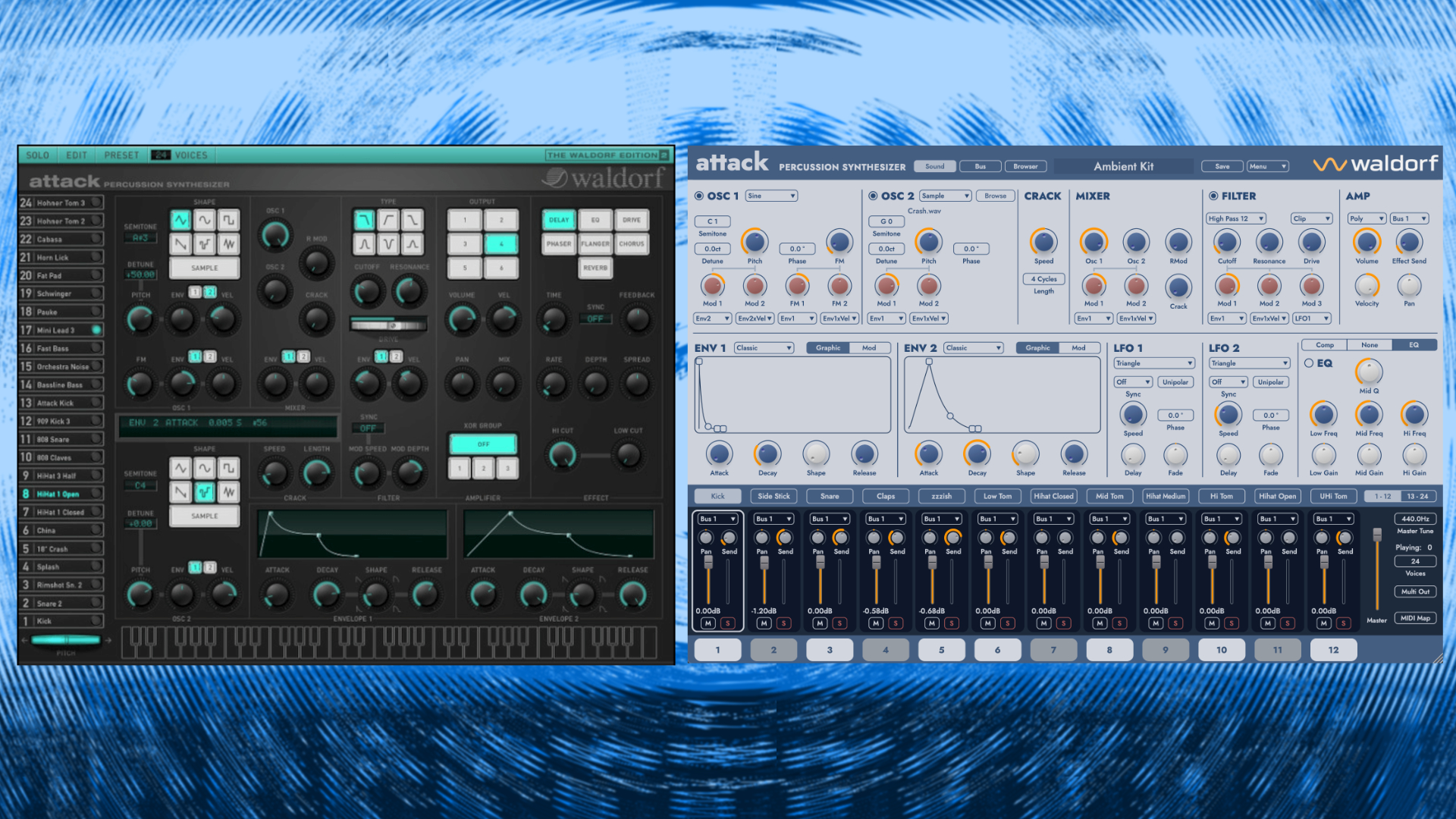
It’s a very simple “less is more” design without any graphics that suggest a hardware device. I think that’s the right choice for this plugin.
The Attack hardware was a rack unit with a matrix layout, and using that as a model for the UI wouldn’t have been a good fit. You can freely scale it by dragging the bottom-right corner of the window left or right. Alternatively, there are various zoom levels in the menu.
In addition, it includes a new easy-to-use sound browser and other UI features. The UI consists of two main sound design areas: sound and bus effects. Unlike Attack 2, you also have MIDI learn functionality with min and max parameter ranges.
What Does An Attack 3 Voice Consist Of?
The engine framework was taken from Attack 2, but updated in many areas, making it more sophisticated and flexible. A spoiler: it’s the most powerful Attack sound engine ever designed.
Like its predecessor, Attack 3 features 24 drum synth voice channels, each a standalone full-tweakable drum/percussive Synthesizer.
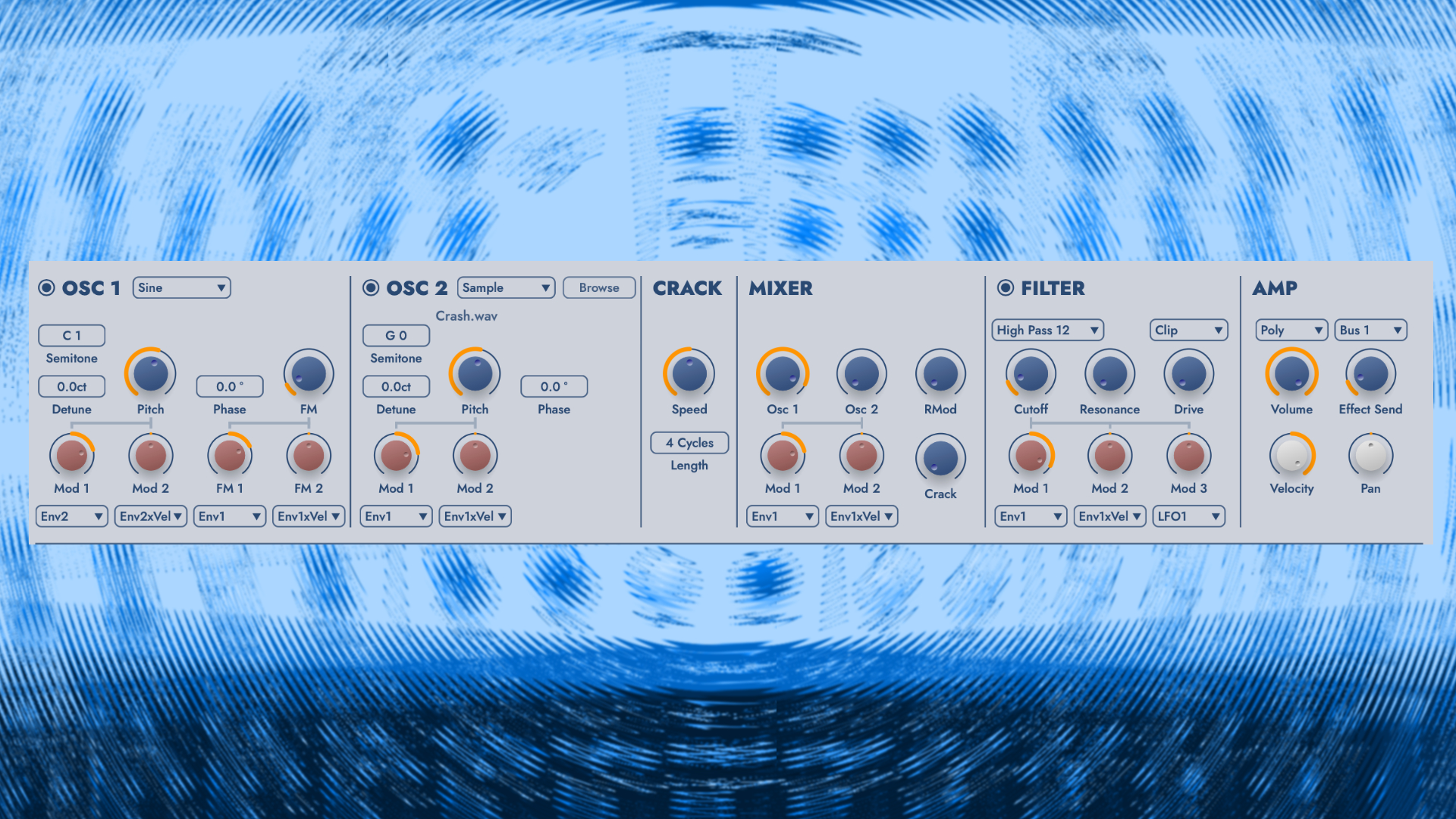
Each voice consists of a hybrid synth voice with two oscillators, a crack generator, a mixer, a filter, an amp, two envelopes, two LFOs, a compressor, a multi-FX, and an EQ.
These are the building blocks for our drum and percussion sounds. Hybrid, because Attack 3 uses both virtual-analog synthesis and samples. For a change, no wavetables.
The VA section offers a variety of waveforms tweakable with classic controls. They cover everything you could want in drum sounds. From punchy kicks, classy snares, and hi-hats to percussive FM sounds.

Yes, FM is possible with oscillator 1, offering two assignable FM modulations. I particularly like the routable LFOs because they operate at audio rate, allowing you to generate some very crazy, noisy sounds.
Also not to be underestimated are the sample & hold and noise options in the oscillators, which allow for all sorts of broken, dirty percussive bleeps and blops.
Can I Use My Own Samples?
Alongside the versatile VA oscillators, you can also use samples as oscillators. Unlike Attack 2, Attack 3 now allows you to import your own content. Finally! You can customize them with classic controls, including the sample start, but not the sample end.
Waldorf didn’t stop at just offering a simple import function in Attack 3. You can map your samples in four different ways. Classic mode lets you import the sample and use it in an old-fashioned way.
Then, the new velocity map mode lets you map up to four samples, each with an independent velocity zone. Additionally, there are two round-robin modes, also with four samples. My favorite is the random-robin as it gives you a random sound with every trigger.
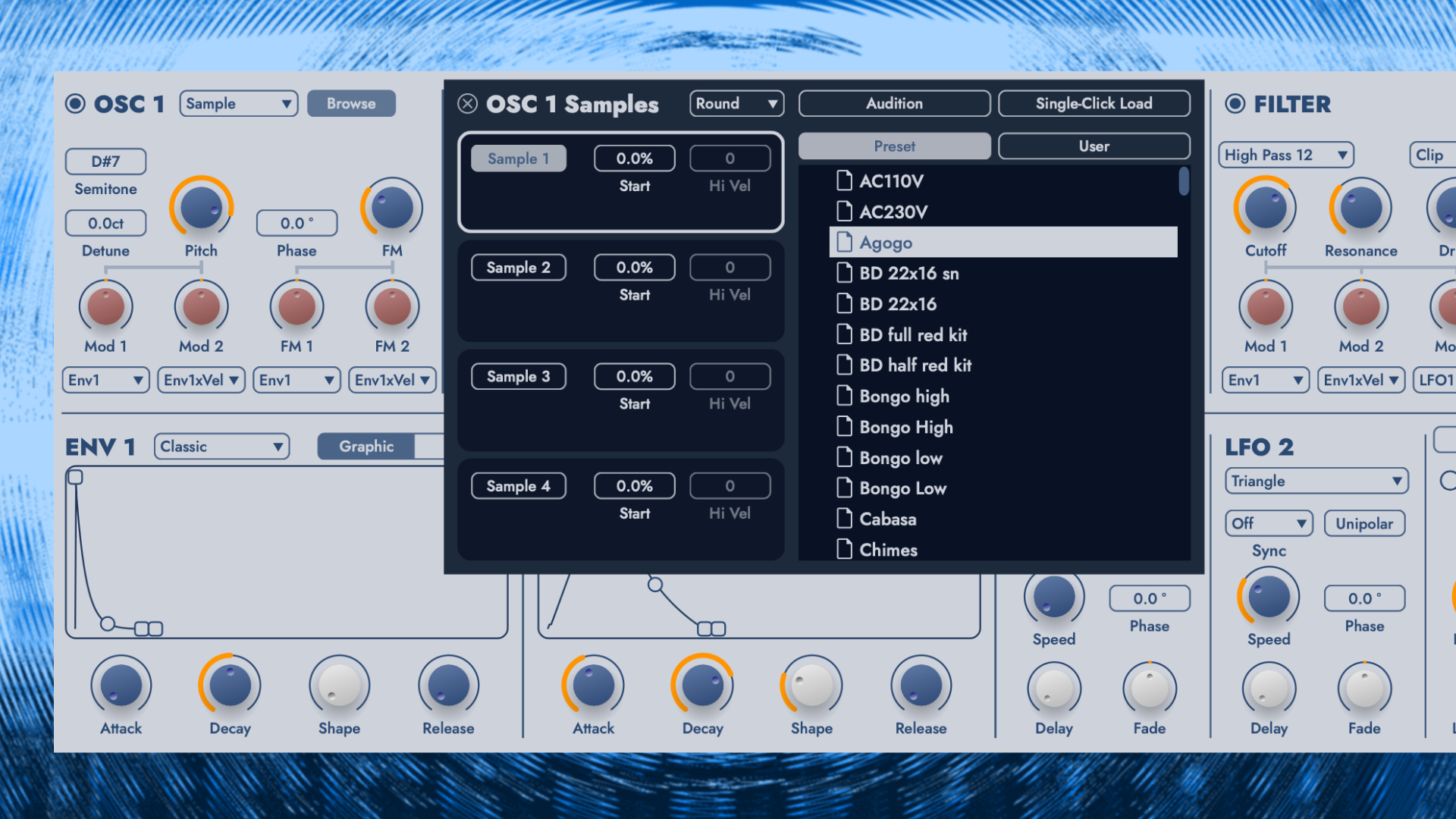
And that’s per oscillator. That means you can have 2x4x24, or 192 possible samples in one kit if you use this “round robin” function in every channel. The sample option also unlocks hybrid drum/percussive sounds.
Additionally, a crackle generator is designed to produce handclap-like sounds via a sawtooth waveform and amplitude modulation.
All signals converge in the mixer. In addition to mixable ring modulation, the oscillator levels can also be modulated. Practical for giving signals an organic flow, or even for more adventurous sounds, as mentioned, with the audio rate.
Three-Stage Shaping
In the next step, Attack 3 voice takes the sounds into the filter section, where you can explore 15 different ones. New filter types, including 24 dB types, positive and negative comb filtering, and sample rate reduction.
There should be a suitable filter for every drum shaping task. It’s great that more unusual filters are now included, such as the comb filter, which can significantly shape and color the sound in new acoustic-like, organic directions.
Cutoff and resonance are also fully modulatable. The built-in upgraded overdrive right after the filter adds spice, warmth, and dirt to your sounds. With clip, transistor, diode, crunch, pickup, and overdrive, you have a colorful set of algorithms to explore.
Depending on which filter and overdrive type, you can create very industrial-style and experimental sounds. And I’m even ignoring all the modulation options that are also available for the overdrive.
It’s a shame you can’t choose whether the drive is pre- or post-filter. That would raise the flexibility bar even more. Resonators would have been a nice alternative to filters. Maybe a feature for the future.
From here, it goes into a new voice multi-FX section with a built-in compressor, 3-band EQ, and a selectable FX with classic algorithms like delay, reverb, and more. Nothing special, but neat for polishing up the sounds.
The audio signal chain of a drum voice ends in the amp section with level, bus effects sends, velocity, and pan control. Plus, you have selectable XOR groups. This is a synth voice from the audio side that’s available 24 times.
Waldorf Attack3 offers an impressive arsenal of channel-based tools for drum sound design from scratch, keeping you busy for a long time. A brief but in-depth look at the modulation engine is essential as well.

A Deep Modulation Soul
The modulation engine is what makes the drum synth voice truly versatile and flexible. Sometimes also unpredictable. Two envelopes and two LFOs are the engine’s driving force. Additionally, you have random generators, velocity, aftertouch, modwheel, and more.
However, the first ones mentioned are the most flexible. The envelopes have two distinct modes: classic A D Shape R and a modern Attack Decay 1 Break Decay 2 Sustain Release (ADBDSR) envelope. Both are graphical or classic tweakable with knobs.
The ADSR envelope is snappy and handy for classic sound design duties, like pitch mod routing. The modern ADBDSR envelope enables the creation of more complex modulation animations, particularly helpful for long, sustained sounds.
What makes the whole thing way more fun is the ability to modulate each stage independently. For example, you can achieve different envelope behaviors for each trigger.
In a drum machine setup, it gives you a very organic, ever-evolving sound. Take the random generator, and the whole becomes very unpredictable and surprising with each new trigger.

The LFOs, on the other hand, have multiple waveforms with unipolar and bipolar options, are syncable, and cannot be modulated. However, they run at audio rate, perfect for rapid tremolo/vibrato or gritty FM sounds.
Delay and fade functionality are lovely additions for delaying the modulation’s impact or simply smoothing it. The sound plays, but the movement only begins seconds later, which opens up many sound design possibilities.
Even without a modulation matrix, the mod engine is one of the highlights that gives percussive sounds an extra edge. Whether adding dirty audio-rate manglings or simple movement.
You can modulate almost everything except the effects. It’s a major upgrade over Attack 2.
Mixing & Refining
A multifaceted sequencer is not part of the plugin. Upon request, they wanted to continue with the initial Attack concept and keep it as a purely multi-layer percussive Synthesizer. At least, the plugin has pads and a selectable keyboard for playing the sounds chromatically.
I know what you think: no internal than it’s time for an external sequencer or the DAW piano roll. A mixer section with individual channel strips provides an overview of all the sounds. Unfortunately, not all 24 are visible at a glance, but are spread across two pages.
For each channel, you can set volume, mute solo, and pan them on the fly, and work with bus send effects.
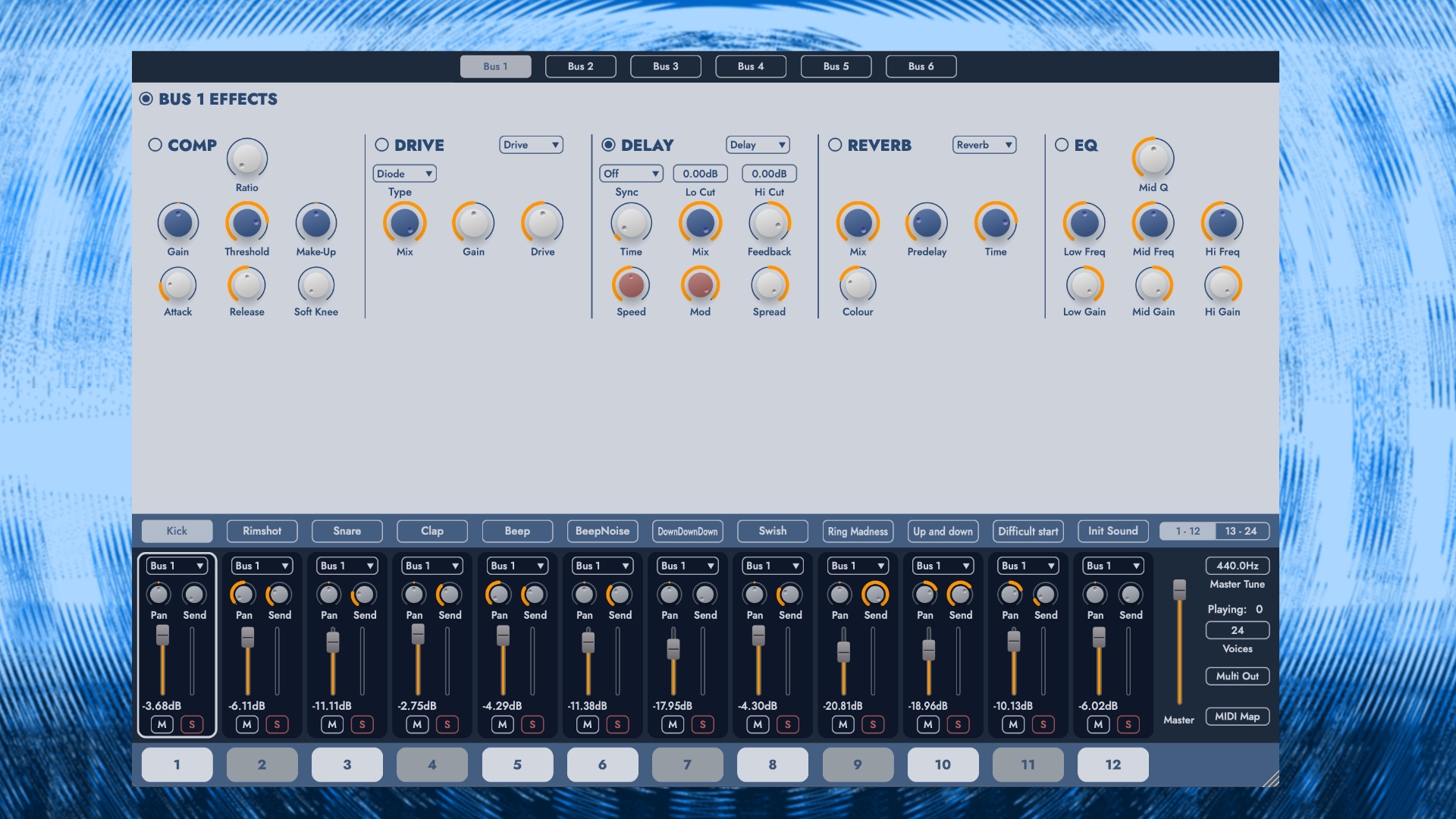
Yes, the bus sends effects. Waldorf Attack 3 introduces a 6-channel bus FX system, each featuring a compressor and EQ plus three freely selectable effects, including chorus, delay, reverb, drive, phaser, and flanger.
These can be used to further shape sounds, or simply to give them the final polish. Adding a bit of drive can give them character, for example, or delay/reverb to lend them more spaciousness.
The sounds can be routed in stereo or in a multi-out mode with 6 stereo audio outputs. It’s a handy option as it gives you freedom to mix and process a set of voices differently from others in your DAW.
Sound Management & Design
Waldorf ships the new Attack 3 with a factory library of ready-made drum kits, drum voice presets, and samples. It includes classics like synthesized 808, 909, and CR-78 kits, as well as original kits.
An all-new sound browser handles sound management and all the associated duties: loading, saving, user sounds… It’s a very easy-to-use browser. I just wish there were arrows that let me quickly switch sounds without opening the browser.

Attack 3 is too good to just use for playing presets, because the engine allows you to easily design your signature drum sounds from scratch. The option to combine synthesis and your own samples, in particular, allows you to craft very original hybrid sounds.
The engine covers everything from classic analog-style punchy kicks and melodic percussion to industrial, noisy, and even experimental effects. The latter category can be beautifully designed using sample-and-hold or noise waveforms, FM, and audio-rate modulation.
And those who want to do sound design without a mouse, there is also MIDI CC support for all parameters, allowing you to tweak sounds hands-on.
Waldorf Attack 3 Review Conclusion
With Attack 3, the Waldorf plugin finally receives the full attention it has never received before. Moving away from being part of Waldorf Edition 2 and towards becoming a standalone percussive Synthesizer plugin for macOS and Windows.
Attack has evolved both visually and sonically. With sample import, more filters, supercharged modulation power, and effects, the plugin boasts a more multifaceted and flexible character than ever.
Of course, there’s always room for more. Compared to Unfiltered Audio’s Battalion, the synthesis here is more traditional than avant-garde. There is no better or worse. Both approaches master it and create colorful bouquets of electronic percussive sounds.
I’d also like to see physical modeling drum synthesis in Attack 3. Whether that still fits with Attack or should be part of a different drum synth altogether is another question.
Waldorf Attack 3 is available now for an introductory price of 49€ instead of 99€. Existing owners of Waldorf Edition 2 (full version) can upgrade for 29€ instead of 49€. Users of Waldorf Edition 2 LE can upgrade at an. introductory price of 39€ down from 79€.
These deals are valid until February 22, 2026. It runs as a VST, VST3, AU, and AAX plugin on macOS (native Apple Silicon + Intel) and Windows. Full versions and updates are available from the official website + retailers.
If you buy from AudioDeluxe or Plugin Boutique, you will get a free plugin with every purchase in February
More information here: Waldorf
Available from my partners


Be the first to comment