
BeepStreet Otoo is a playful, colorful groovebox for iOS and macOS from the Drambo developer, featuring a built-in sampler, AUv3 hosting…
With Drambo, BeepStreet has created arguably the most powerful groovebox for iOS and macOS in the App Store. It features a fully modular engine with numerous synthesis and sample oscillators, filters, effects, complex sequencing, and more.
Yes, this flexibility and depth can be overwhelming at first. Yes, you need to spend more time with it. For those who prefer something simpler and more playful, BeepStreet now offers Oota, a groovebox that takes a different approach.

BeepStreet Otoo
Otoo is a new, playful groovebox for iOS and macOS. It isn’t a Drambo Lite; BeepStreet Otoo has its own concept that’s more immediate and less focused on sound design. So, no modular engine with endless options.
The developer describes it as a playful instrument for making beats and melodies, designed to feel easy from the first tap yet deep enough to keep growing with you.
Unlike Drambo, it’s based on a free-form step sequencer that lets you place, drag, and stack notes freely, rather than locking everything into rigid rows. You can make tracks with up to eight instruments per project, but the way you can use them is original.
In classic grooveboxes, you have one channel dedicated to the kick or bass. Here, you can have multiple sounds run simultaneously on a single or multiple channels, making it very flexible. Each dot is a sound and is color-coded. Use monophonic content or simply stack notes to achieve chords.
Per-step control of length, subdivision, and velocity gives you more flexibility. On iPhone, you have four rows, while on iPad, you have five, with multiple instruments available in each row at different steps.
The Otoo sequencer engine also has a song mode, where you can glue patterns to entire tracks. Neat on-the-fly adjustable loop markers let you arrange your songs quickly and differently.
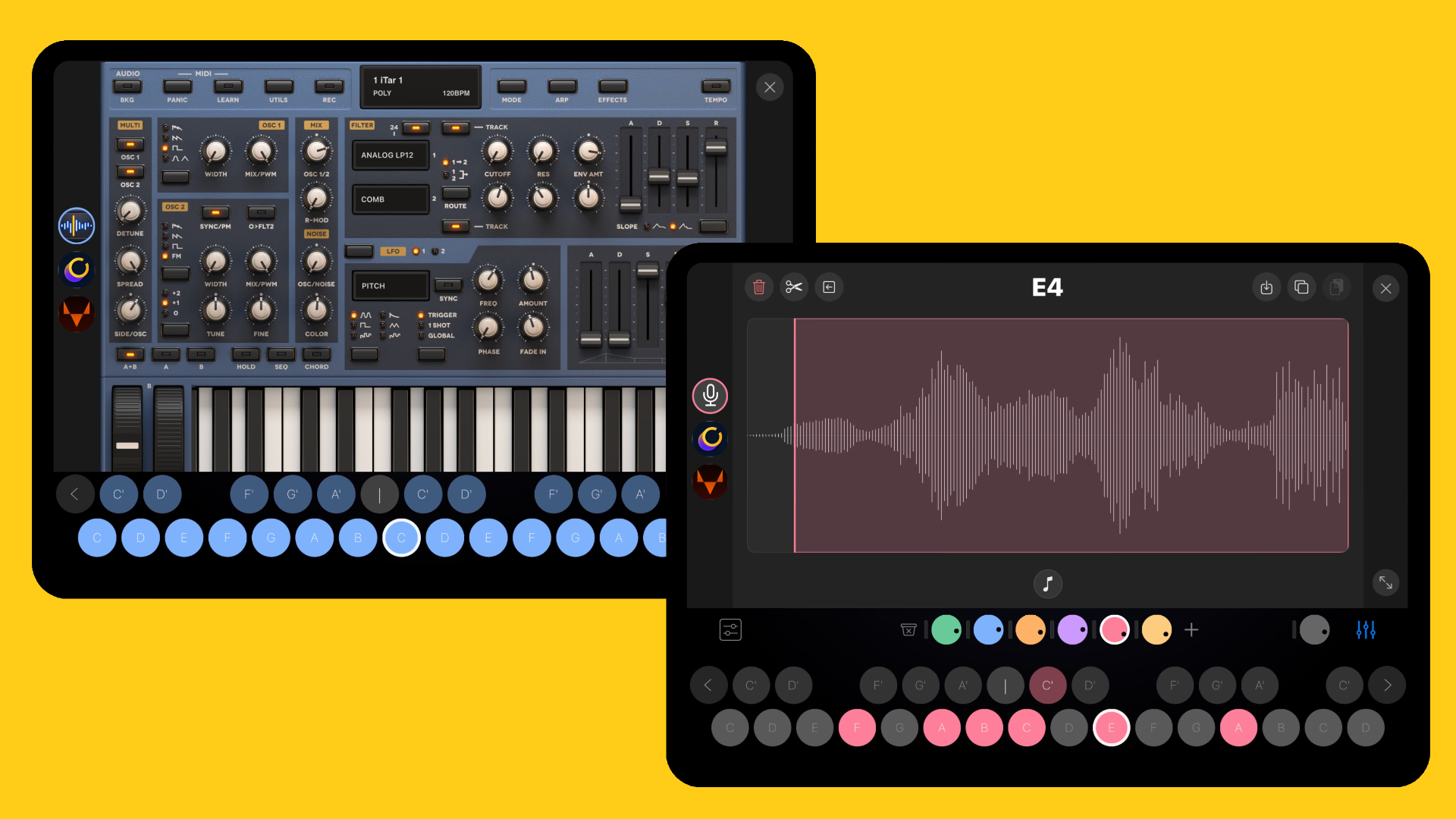
Hybrid Engine
BeepStreet has also implemented a sound engine in the Otoo groovebox. It’s a hybrid engine with three options. Either you use the built-in sounds with Otoo ships, or you can use the sampler with instant key-by-key recording and chromatic mapping
Alternatively, if you want something more versatile, you can use the AUv3 hosting functionality and run your favorite synthesizers and other instruments as sound sources.
I like that AUv3 instruments have a large, near-full-screen view with a keyboard, so you can tweak them without having to switch many windows. It also offers two AUv3 effects slots per instrument for shaping and polishing your built-in sounds or AUv3 synths.
To save CPU resources, it would be nice to have an option to sample the AUv3 instruments into the built-in sampler and use them in the groovebox. This way, you wouldn’t need to open the AUv3 plugin every time.
All your sounds can be managed via a multi-gesture mixer with muting, soloing, and volume control. To spice up your patterns, it also has built-in audio effects, including reverse, beat repeat, randomize, swing, triple, tape, and more.
Lastly, you have a main output with built-in level protection, an automatic metronome, and an export function for patterns and the full song as a WAV and MPE file.
First Impression
From time to time, I struggle with the depth and possibilities that Drambo offers. You really have to be familiar with the engine to tame this beast. It’s different here.
From what I’ve seen so far, Otoo is much more accessible to everyone, including newcomers. The design is inviting and encourages play. It’s way more straightforward than Drambo, but still a mighty groovebox with many options. It’s a great introduction to the BeepStreet groovebox world.
BeepStreet Otoo is available now for $4,99 and runs as a standalone app and AUv3 plugin on macOS (native Apple Silicon) and iOS (iPhone/iPad).
More information here: BeepStreet/App Store
Be the first to comment