
Review: Novation has transformed its popular Launch Control XL into an upgraded standalone USB MIDI controller for hybrid setups in version 3.
At Superbooth 2025, Novation unveiled the Launch Control XL 3, the successor to their best-selling USB MIDI controller from 2017.
I’ve had the controller in the studio for a while now, but I was waiting for the first major update, which arrived last month (January) as version 1.1.

Thanks to Novation for the opportunity to check out and review the new Launch Control XL3. They sent it to me for free, but they have no say over the review and don’t get to see it before I publish it.
Novation Launch Control XL 3 Review Summary
Pro
- build quality
- customizability (hardware, software, but also hybrid configurations)
- 5-pin MIDI connectivity
- price/features
Neutral
- no lights on the faders
- configuration only from the components web application on desktop browsers/download
Contra
- No push and touch functionality for the encoders
- not possible to create multiple pages for a mode
Unboxing
The Launch Control XL 3 arrives in a very orange box. Inside, you’ll find the controller, a USB-C to USB-A cable, and a small quick-start manual. There’s no power adapter included, but it has a reason.
It’s a pity that they didn’t include a USB-C to USB-C cable in the box as an alternative. They don’t cost much more, and everyone has the right connection right away.

Connectivity
Before we take a first look at the controller, let’s check out the backside. From left to right, you have a USB-C port for data and power, 5-pin MIDI connectivity with an input and two outputs, while the second also works as MIDI thru. Plus, there is a Kensington lock.
Yes, you see it right. There’s no dedicated power input. That’s because the Launch Control XL 3, like its predecessor, is bus-powered. If you’re using it standalone, you can use it with a regular USB charger or a power bank.
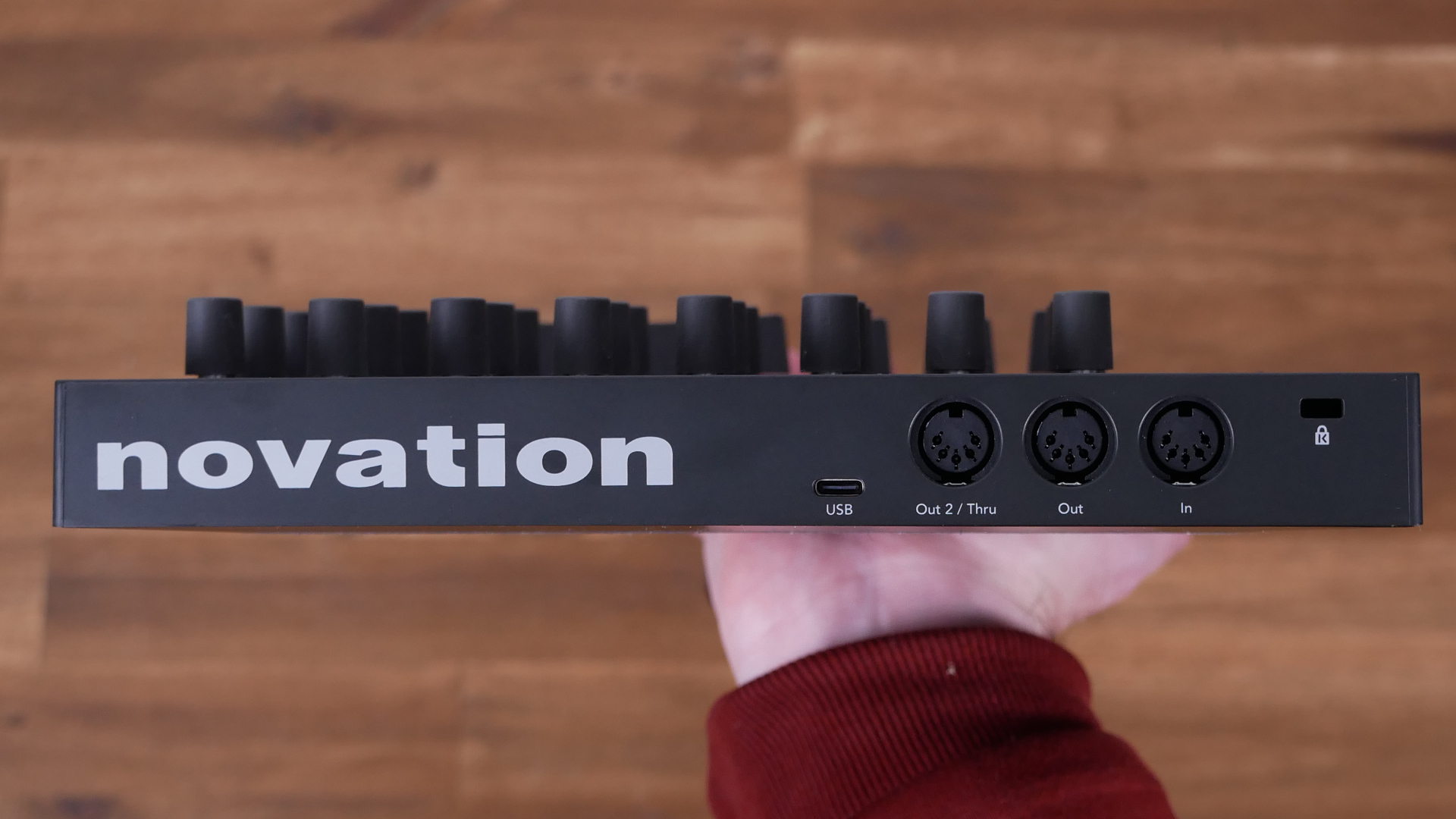
Since the device does not transmit audio and is purely a USB controller, there is no risk of noise. Therefore, USB power is perfectly sufficient.
The 5-pin MIDI connectivity is a huge upgrade, making the controller standalone for the first time and no longer completely dependent on the computer. And thanks, Novation, for old-school 5-pin connectors.
Encoders, Faders, And Buttons
The original concept of the first and second Launch Control MIDI controllers was also adopted for the Launch Control Mk3. Only the appearance is more modern. It’s compatible with macOS, Windows, iOS, Android and any MIDI device.

The control surface (250 x 239 mm) has three sets of eight endless rotary encoders, eight 60mm faders, and 16 assignable buttons. It also houses a small transport section (Play, Stop, and Record), and buttons for Track/Page, Shift, and Mode.
A new feature not previously seen in any Launch Control is the OLED display on the top left side. At roughly the size of a postage stamp, it is very small, but sharp enough to display everything clearly.

The encoders and buttons also have customizable status LEDs. It’s a shame the faders don’t have LEDs. I wonder why. It wouldn’t have cost much more.
In use
The encoders have a good grip. They’re a bit stiff to turn, in my opinion. I prefer faster-turning ones, but you can get used to them.
Unfortunately, the encoders are neither touch-sensitive nor clickable (push). This is to be a missed opportunity, as these functions would make it more versatile.
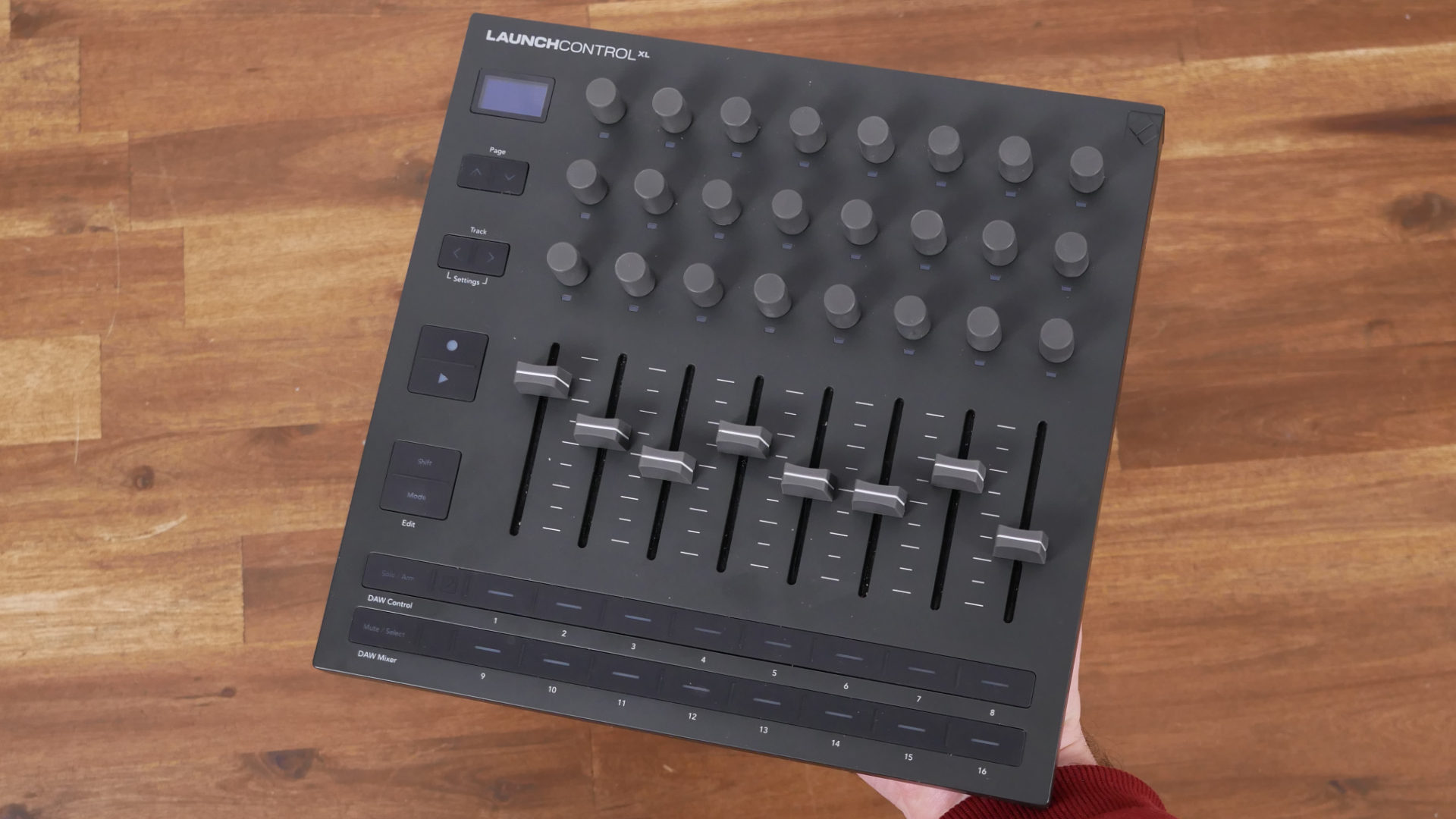
They are made of rubber, but I hope they don’t get as sticky over the years as they did on early Arturia products. On the side, the faders underneath are buttery-smooth to operate, and the buttons are also very pleasant to use.
Neat is that Launch Control MK3’s control surface is slightly angled towards the user, which improves the readability of the display and the numerous status LEDs. You don’t really notice it in the product photos; you only realize it when you’re actually using the controller.
Overall, a great build quality. The controller also has a pleasant weight and feels significantly more robust and mature than the MK2 version, which felt very plasticky.
Novation Components
There are two ways a user of a Launch Control XL3 will inevitably have to go: the USB port for data or power, and the Novation Components web software. The latter is the central hub for configuration.
There’s little you can configure directly on the hardware. For custom modes and other settings, you are forced to use the Novation Components software. It runs in any Web MIDI-compatible browser, such as Google Chrome and Opera.
There is still no support for iOS. Neither Apple Safari nor Google Chrome works.

This isn’t Novation’s fault; it’s Apple’s, since all iOS browsers are based on WebKit, which in turn doesn’t support Web MIDI.
It’s annoying, especially if you primarily use the LCXL3 with iOS; you have to switch to a desktop system every time to configure the controller. I hope WebKit gets MIDI support in the future. Come on, Apple!
Alternatively, you can download the Component software to your computer.
Configuration
To use Novation Components, you don’t need to install any extra software. Simply connect it to your computer via USB, open a compatible browser, and you’re good to go.
The software environment allows for complete customization of the controller. This includes the encoders, faders, and buttons.
For each of the 24 encoders, you can give a custom name, change the message type (MIDI CC or NRPN), and set the CC number, min + max values, MIDI channel, the resolution, and the color. The faders are adjustable to the same extent, minus the color option.

More message types (MIDI CC, note, program change, NRPN, and keystroke) are available for the buttons. Plus, you can set the on/off values, behaviour (momentary or toggle), MIDI channel, resolution, and two colors (main and on).
The settings are saved in so-called modes, up to 15 of which can be stored in the hardware. You can also save more modes in the web application or export them as files. Plus, there are factory modes like for the Elektron Digitakt, Circuit Tracks, Serum, and more.
In testing
Everything worked flawlessly. The ability to customize each encoder extensively with its own color and MIDI channel is a very powerful tool. This allows you to control various devices, both hardware and software, within a single mode.

For example, four encoders could control hardware synth X, while the faders control my AUM mixer on my iPad, and other encoders could control additional synths. This enables very complex hybrid setups within a single mode.
Yes, you see page buttons on the interface; however, there are no actual standalone pages for the assignments. For example, if you want to map a synth that has more parameters than the Launch Control XL 3 offers, you have to create a second mode.
I would prefer a second page that lets you quickly switch back and forth without changing your current mode. Especially when it’s the same device being controlled.
Now we move from theory to practice in this Novation Launch Control XL 3 review. For this, I’ve set up several configurations to see how I perform and tested whether they work.
Tempera – The Standalone Demo
A MIDI controller can be used in a variety of ways. Depending on the connections, its functionality can extend beyond computer-based applications. This is the case with the Launch Control XL 3.
Thanks to its full MIDI interface, it is the first Launch Control XL that works standalone. This means you can use it to control parameters of external synths, drum machines, grooveboxes, or pedals. Provided that the synth supports MIDI and MIDI CC.

For the first one, I brought the Beetlecrab Audio Tempera onto the testing table. The Tempera is a great granular Synthesizer that creates incredibly beautiful textures. However, I haven’t quite along with the interface yet, as the menu diving isn’t very inspiring to me.
Before connecting the Launch Control XL 3 to Tempera’s handy USB host port, I designed custom Tempera modes in the Novation Components software with all MIDI-controllable parameters.

That worked without any problems. However, the number of Tempera parameters far exceeded the number of hardware MIDI controls, so I created four modes. I would have preferred four pages in one mode.
As an example, on the first page, I put all the core functionality, such as filters, effects, and track mixing via the faders. More advanced functions are distributed across the other modes. Switching between modes is instantaneous, but I would prefer pages within each mode.
Waldorf Protein with MIDI merge
For the second configuration demo, I opted for a slightly simpler mapping setup. Here, I used the Waldorf Protein. Since it doesn’t have a USB host, the MIDI was routed through the 5-pin MIDI interface. To play the Waldorf, you also need a keyboard.
By the way, you can assign the buttons to specific MIDI notes, effectively giving you a rudimentary 16-key MIDI keyboard without expressivity if you don’t have one handy.
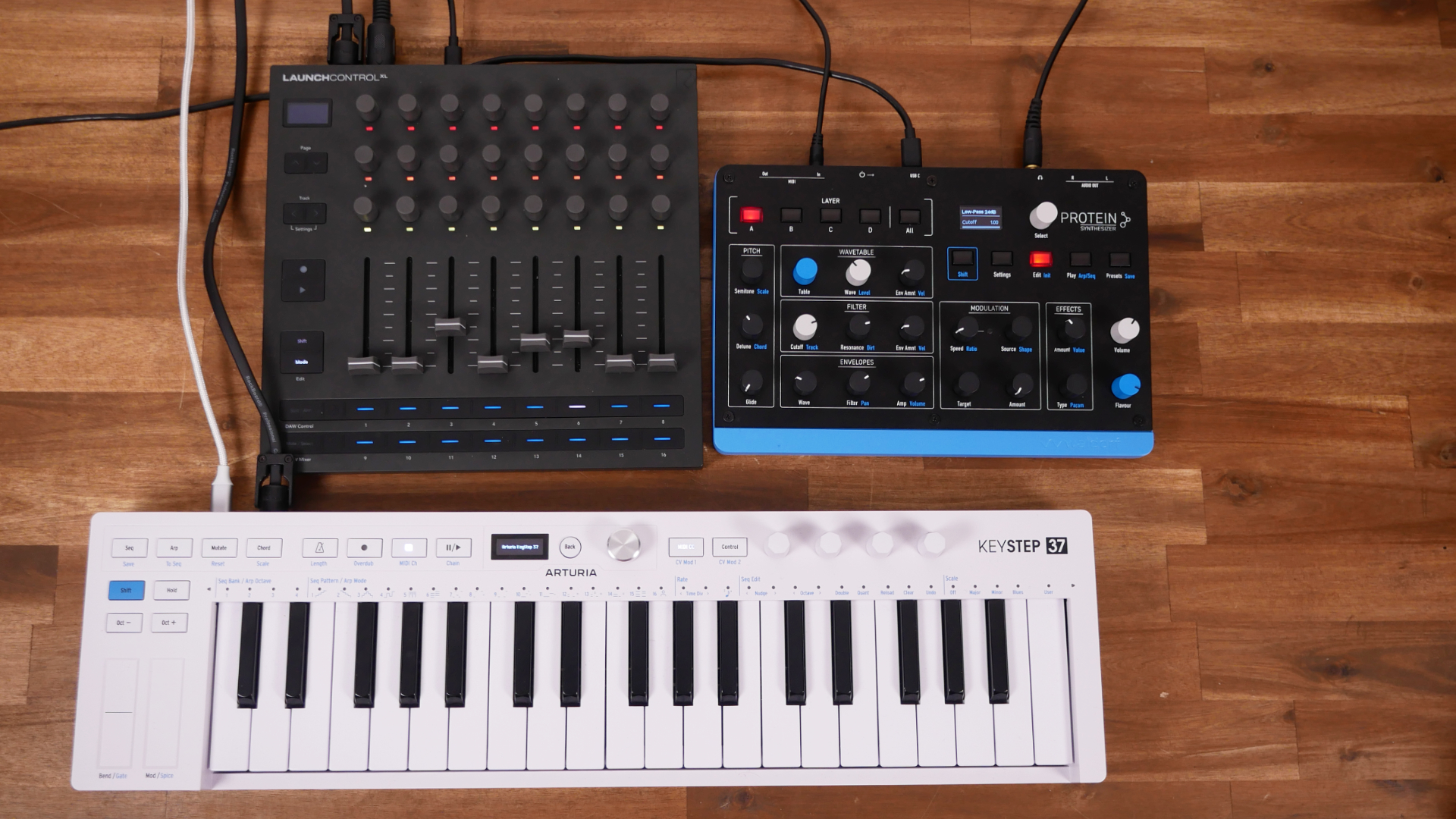
In this setup, I’ve only mapped parameters that can be tweaked via shift combinations or menu navigation to speed up the workflow. This works instantly here, too. But it was more important for me to test whether the MIDI merge works.
For this, I connected the Arturia Keystep 37 MK2 (test online) to the LCXL3’s MIDI input and routed the LCXL3’s MIDI output to the Waldorf Protein.
Thanks to the MIDI merge, I can route both MIDI keyboard data and MIDI control data from both devices to the synth. It worked without any problems.
The Hybrid Advanced One
A third configuration option I wanted to test in this Novation Launch Control XL3 review is to run the entire system in “hybrid” mode. This is made possible by the nature of the modes.
Since each parameter in a template/mode can have its own MIDI CC and even MIDI channel, it offers you the option to control hardware and software at the same time without changing modes. I’ve built a small jam setup to demonstrate this.
The heart of my setup is my iPad with the AUM audio mixer app. I use the Zoom L6 as my audio interface, which is connected directly to the iPad.
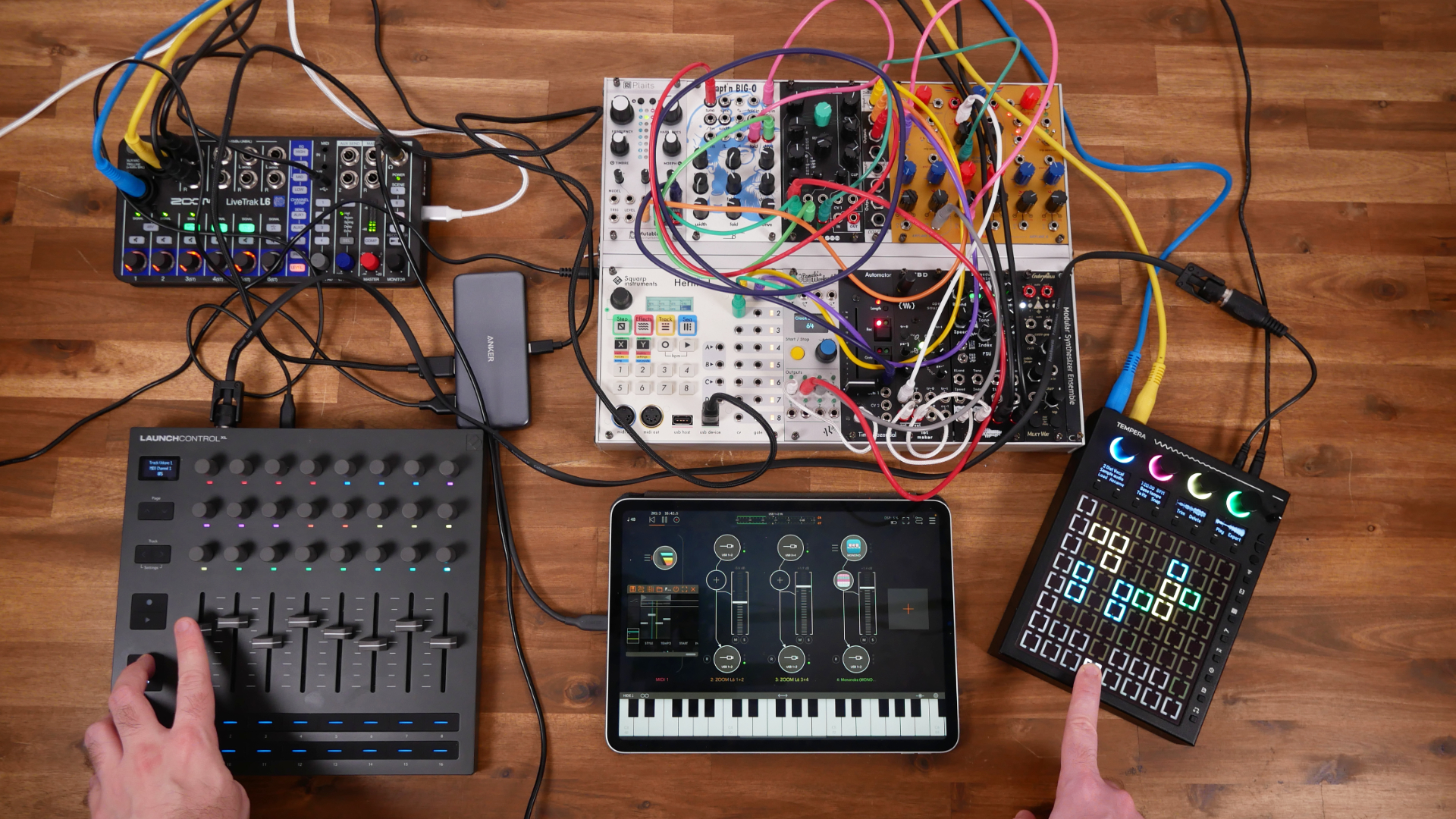
On the table is a Tempera, a small modular synth, and a software instrument with an effect processor. Additionally, a MIDI sequencer app is running to control the modular system. Now, let’s talk about the Launch Control XL3.
The Novation controller is connected to the iPad via USB MIDI, and the 5-pin MIDI output is routed to the Tempera synth.
I’m limiting myself here to a single mode with hybrid mappings. Some of the encoders tweak parameters of the Tempera, others the CTAG TBD module, which communicates with the iPad via Wi-Fi, and the faders control the channel strips in AUM.
Even though I was initially a bit skeptical about whether it would all work, everything worked perfectly right away. The ability to use different colors makes it very clear. It would be even better if the faders also had colors.
The Obvious One – Ableton Live
The Launch Control XL is always associated with Ableton Live. No wonder, as Novation initially marketed it as a controller for Live. It’s now much more than that. One shouldn’t forget to test the original function, as it remains a key reason many buy it.

There are two modes available: DAW mixer mode maps all your mixing-relevant controls to the pots and faders, including volume, effects sends, mutes, etc., while DAW control mode maps to Ableton devices.
More precisely, the first two rows serve as device controllers, while the third row provides transport controls such as loop active and loop end, among others. The LEDs under each encoder are very helpful here.
Update 1.1
In addition, there’s support for other DAWs, such as Logic Pro. Since update 1.1, the Mackie HUI has been supported, making it easier to work with other DAWs.
I only tested the controller with Ableton Live, as that’s my main DAW. Therefore, I can’t say much more about it. Also, a great addition in update 1.1 is the option to choose between two fader pickup types: pickup and jump.
Novation Launch Control XL 3 Review Conclusion
The Launch Control XL is one of Novation’s best-selling controllers and has been a core part of the lineup for over a decade. The original model debuted in 2014, followed by the XL 2 in 2017 and the XL 3 thereafter.
With the new Launch Control XL 3, Novation pushes the concept further. No longer just an Ableton Live companion, it has evolved into a versatile standalone MIDI controller built for modern hybrid hardware/software setups.
The new features, especially full 5-pin MIDI support and full customizability, represent massive product improvements. Of course, the concept could have been pushed further with a MIDI sequencer or CV/gate, but you also need some room for upgrades for later versions.
On the other hand, I find it a shame that push or touch encoders weren’t on the bucket list. That would have rounded things off even better. The option to have multiple pages for a single mode is also sorely missed. However, it is something that can be added via a firmware.
All in all, the Launch Control XL has now arrived in the modern MIDI controller age and makes its predecessors simply forgotten.
Novation Launch Control XL 3 is available now for $249,99/219€.
More information here: Novation
Available from my partners
Thomann

I really want a non XL version of this
true.
too big for a device, that Has No Tone Generator.
And if it’s too small, they say: it needs to be bigger 😉
I bought one, but I returned it. I was very disappointed by the small number of Novation Custom Modes included by default in Novation Loop Control for hardware synths. It doesn’t even include all Novation synths! They could have provided more; that would have been a good selling point.
why not making your own modes? It’s super simple in the Components Software. I made one for the BC Tempera and other synths.
You are right, but it takes a long time (finding the CCs, mapping them…). I would d rather make music ! 🙂 Besides, I am sure people with the same synths as me have already created custom modes for themselves. Novation should allow the community to share and import custom mods.
I think you have the 30 minutes that it takes 😉
Great review, but there’s A MAJOR flaw with the unit – if you’re using it to map CC controls of a hardware synth, they should have included stenciled templates (like they did with the X-Station) so you can write the name of each control – otherwise, it’s hell trying to remember what CC each control is assigned to.
yeah, I’m pretty sure there will be a third-party vendor offering these in the future 🙂
“There is still no support for iOS. Neither Apple Safari nor Google Chrome works. This isn’t Novation’s fault; it’s Apple’s, since all iOS browsers are based on WebKit, which in turn doesn’t support Web MIDI.”
No that is Novation’s fault. They know exactly what can and can’t run on IOS. Novation choose not to develop an editor for it which is a shame and they probably loose a lot of potential buyers because of it.
Personally I sold mine very quickly. The display is too small and in the wrong place and the whole unit just felt like old news in a new jacket done in the wrong way.
the controller supports iOS but not Novation Components. So you can programm it on Components on macOS/Windows and use it on iOS.