
Arturia takes its massive FX Collection to level 6 with more reimagined classics, original sound processors, & unmissable studio helpers
When discussing Arturia synthesizer plugins, the V Collection quickly comes up, which bundles all plugins except Pigments. The equivalent in terms of effects plugins is the FX Collection.
Version 5 was released in June 2024, shortly after Superbooth 2024. Now, almost two years after its release, Arturia FX Collection 6 is ready for purchase and download – in a Pro and Intro version.

What’s In The FX Collection 6?
FX Collection 6 is the next version of Arturia’s massive FX bundle. It now includes 39 plugins, 5 more than version 5. Like V Collection 11, you can now get a PRO version, featuring all 39 plugins, and a budget-friendly INTRO with 10 effects.
As in previous versions, most of the plugins have been released over the last two years: TAPE-74 (December 2024), Mix Drums (June 2025), and Bus Transient (October 2025).
New at the time of the FX Collection 6 release are the EFX Ambient and PITCH SHIFTER-910 plugins.
In addition to the 5 new ones, FXC6 users also have access to all 34 existing plugins, ranging from reimagined classics and original sound processors like the EFX REFRACT or EFX Fragments to studio mixing and mastering tools.
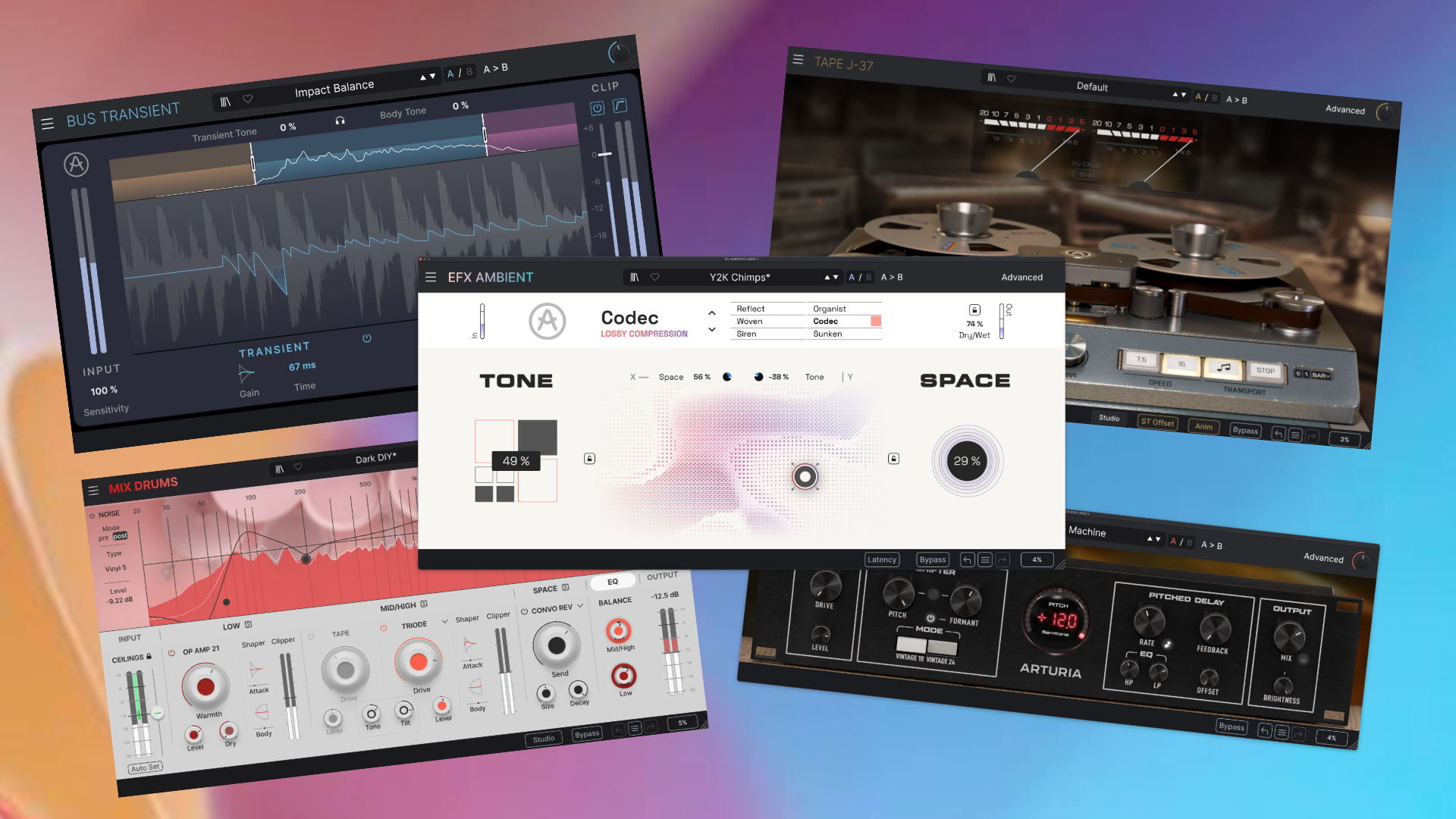
In my Arturia FX Collection 6 review, I focus on three effects plugins in the bundle, as the others do not fall within my regular coverage. I’ll give you summaries of these while offering detailed looks at the other three.
And extensive coverage was provided for the other 34 plugins over the past years: FXC5, FXC4, FXC3, FXC2, and FXC1.
The FX Collection 6 offers a vast array of multifaceted, colorful sound processors that let you transform, enhance, and finish your sounds and tracks.
From traditional must-have effects like reverbs, delays, distortions, or chorus to avant-garde hybrid or experimental effects with spectral and granular synthesis, everything is in this collection.
Since the latest FX Collections focus more on mixing and mastering, musicians looking for more tools in this area will also find plenty on offer here. These range from vintage classics up to original studio tools like the latest Mix Drums and Bus Transient.
Arturia FX Collection 6 Review Summary
Pro
- five new high-quality plugins
- even more multifaceted than before: effects, mixing and mastering in a bundle
- EFX Ambient – an original sound processor
- excellent price value: 12,79€ per plugin without extra deal or crossgrade offer
Neutral
- white interface of EFX Ambient: hope for a darker skin option
Negative
- not always very CPU-efficient.
- No updates for existing plugins that have been in place for a while.
EFX Ambient
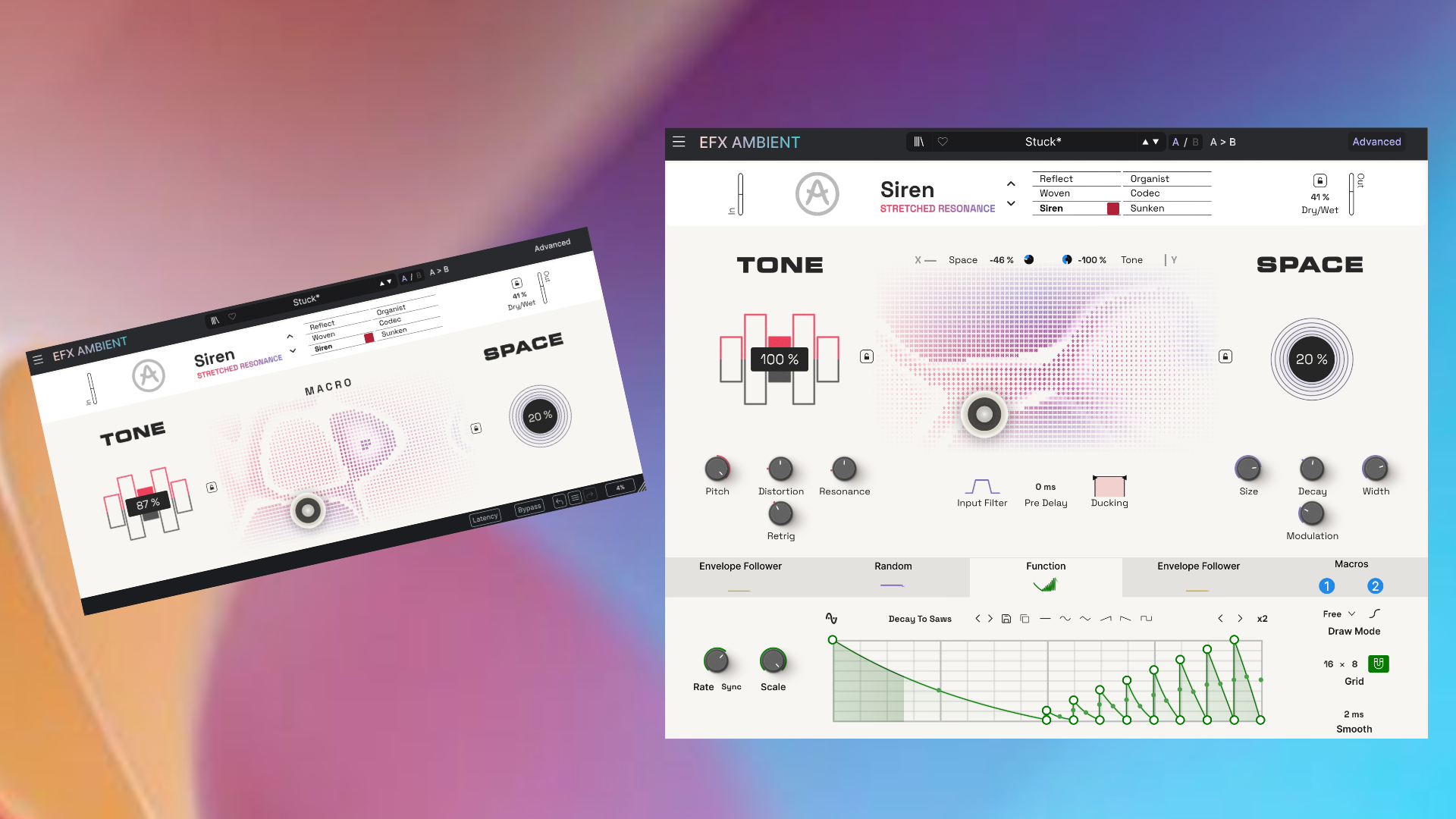
The first all-new plugin is the EFX Ambient, a new ambient texture processor based on state-of-the-art spectral processing and feedback delay networks. The plugin consists of three main sections: tone, space, and a macro block that plays a crucial role here.
In the upper section, you can set the input level of the incoming audio. From here, it goes straight into the colorful tone section without a detour. Why colorful?
Even if the GUI looks somewhat pale in white, this section is very multifaceted and the main core of this new, original Arturia sound processor. 6 distinct algorithms/modes are available, and only one can be used at a time.
Since no manual was available at the time of the review, one is largely dependent on the built-in tutorials, which, however, do not provide super deep information about their basis.

- REFLECT: a granular-like algorithm that reverses your sound and turns it into evolving textures
- WOVEN: a shimmer processor with a touch of tape stutter
- SIREN: a resonator-based texture generator
- ORGANIST: rich harmonic generation (resonator-based?)
- CODEC: LoFi digital degradation
- SUNKEN: deep underwater atmospheres (granular, stuttering…?)
Each mode offers five distinct parameters. For example, the REFLECT mode offers control over pitch, octave, rate, and feedback, along with a dry/wet mix.
The second section is Space, which is a kind of reverb, but also not quite. I would describe it more as a spectral reverb that blends with the overall sound. It adds depth and diffuses to the effect. Size, decay, with, and modulation give you full control over it.
Animation/Morphing
In combination, all the algorithms sound very wild and experimental. You can make things even crazier with the built-in modulation engine, which is hidden in the Advanced section.
Here you can find Arturia’s all-time modulator favorites, including an envelope follower, random generator, a step sequencer, and a function generator.

Each of these features has already been seen in one or another Arturia plugin and has been constantly refined and made more flexible. You can map the modulators to parameters using drag-and-drop.
The macro section is just as exciting. You have two macro controllers (1 and 2 blue dots), each capable of controlling multiple parameters. Unlike classic macro controls, these are the driving force behind the animated X/Y pad in the center of the interface.
Depending on how they are mapped, they can have a more subtle or a more significant impact on the overall effect. The EFX Ambient factory library contains many well-set-up presets, resulting in a very fluid morphing experience that’s a lot of fun.
If you record these as automation, you can make a track evolve very naturally. Unfortunately, there’s no way to record these paths in the plugin itself. I would like it to be like the X/Y recording in the Rob Papen plugins.
Sound Design/Exploring
Okay, that’s the theory, now the practical part: what does the processor do with the sounds we feed it?
EFX Ambient isn’t a bread-and-butter effect you can just slap on any sound or the entire mix. EFX Ambient is a powerful sound design tool, even a source of inspiration. A bit like multiple Chase Bliss pedals in a plugin.
Imagine placing your sound in a field. The sound then triggers flower sprouting like fireworks in every possible color and direction – predictable and unpredictable. That’s how you can describe the process that the EFX Ambient engine does with your sounds.

In this case, the original spectral, granular, or resonator algorithms envelop the sound, shape it, and, through the “SPACE” transform, turn everything into a very textured and fluffy sonic adventure.
The effects range from shimmer-like glitter clouds, reverse grains, heavily saturated emotional tape stutters, and evolving resonances to sounds lost in a Lo-Fi reactor bunker. Adding modulators puts everything on a roller coaster, making it evolve and often become very unpredictable.
Arturia EFX Ambient can be used to give sounds that certain something. Often, a very subtle dose is sufficient to add sparkle. Don’t worry, it also loves heavy sound transformations.
My preferred use for it would be as a source of inspiration. That means I would sample the experimental, glittering output and then use it further in other hardware or software tools. Favorite algorithms are the Sunken and Siren.
Sunken because it has something mysterious about it, and Siren because I love working with resonances, yes, resonators.
Efx Ambient is an inspiring sound design plugin for soundscapes, but you need to use it sparingly. Too much glitter can ruin a lot of things.
PITCH-SHIFTER-910
On to the second new plugin of the new Arturia FX Collection 6: the PITCH SHIFTER-910. The last number should ring a bell for some. Yes, it’s an emulation of a legendary device.
To be more precise, Arturia has recreated the Eventide Model H910 Harmonizer Pitch Shifter from 1974 as a plugin. It was the world’s first commercially available digital audio effects device, used by countless artists like Dave Bowie, Frank Zappa, and others.
The original became a staple studio worldwide for its gritty tone, unpredictable musicality, and the ability to transform sounds in entirely new ways.

Arturia’s version of the 910 features four sections: input, shifter, pitched delay, and output. Input is where the sound enters the plugin. You can adjust the input gain with the level control.
One highlight is the drive knob. It allows you to overdrive the signal before the pitch shifter. This ranges from a light warm-up for adding harmonics to heavy, crunchy distortion. Keep it at 0 for a clean sound.
Shifting & Delaying
In the shifter section, you can choose between two modes: Vintage 10 is based on the original algorithm, while Vintage 24 is a version with fewer artifacts and a cleaner tone. In direct comparison, I prefer the first one because it sounds more vintage, but that’s a matter of taste.
Then you can adjust the pitch, the core function of this processor. This step on the original device produced formants as a side effect that became one of the Eventide 910’s sonic trademarks. In the Arturia plugin, this is available as a freely adjustable parameter.
Linking both parameters restores the original characteristics. Leaving them unlinked results in pitching effects that exceed the 910’s capabilities. Alternatively, you can switch off the formant parameter for a transparent sound.

One step further, and we are in the delay section that can be a standard delay or a pitched delay. You can tweak it with classic controls, including rate, feedback, EQ with highpass and lowpass, and an offset for creating a stereo delay effect.
The unique thing about the pitched delay is that the delay signal is run through the pitch shifter again, creating the shimmering up-and-down pitch effect in the feedback. In the output section, you have a dry/wet mix control and a tilt filter.
In the Advanced section, you can control the pitch shifter with MIDI input. Next to this, a voice mode takes your pitch-shifting sounds to a more ensemble-like level with two built-in voice modes (dual mono/unison). Or, you can add a vibrato effect.
Sound Design/Exploring
Compared to the Efx Ambient, the new PITCH SHIFTER-910 is significantly more elegant, making it better suited for global use. Elegant, however, doesn’t mean it’s ultimately normal. It has the quirkiness, excotic and a bit unpredictable feel of the original.
Just like its vintage hardware model, it makes all the familiar effects. Firstly, it can simply thicken sounds. Vocals, guitars, or synths benefit greatly from it. The unison mode in the advanced section lets you increase the thickness even further.
The most obvious application is to pitch shift the signal up or down. This ranges from -12 to 12 semitones. The switchable formant mode is especially fun, allowing you to create some very exotic pitch effects.
Add the delay in pitch mode, and you get odd, glittering delays. Crank the drive to the middle position or slightly above, and you’ll hear howling voices from the depths of the dungeon. And the vibrato section offers classic pitch-modulation effects.
The PITCH-SHIFTER-910 is a wolf in sheep’s clothing. It looks very classic and understated. But if you start to delve deeper and actively experiment, some truly wild pitch results are possible.
I can’t say whether it sounds the same as the original, or better or worse than competing plugins, as I’ve never owned the original. One thing I can say for sure: it’s a lot of fun.
TAPE J-37
Back in December 2024, Arturia released TAPE-J74, another tape plugin for the FX Collection, which is now part of version 6. It joins the Delay (Roland Space Echo) and the Tape MELLO-FI.
The TAPE J-37 is an emulation of the legendary Studer J37, used by the Beatles and many others. According to Arturia, they modeled the plugin on the original from the Studio Barclay in Paris.
Users can choose from four tape types (color-coded), from pristine to dirtiest, giving you tape saturations from subtle to heavily crisp. A click away is the modern mode that bypasses the typical high/low filtering on tape machines.
If you use this distinct mode, you can combine the analog warmth of vintage tapes with the digital clarity of modern processing. You can coax out an extra boost in saturation with the Drive knob. Effects range from subtle to distortion-like.
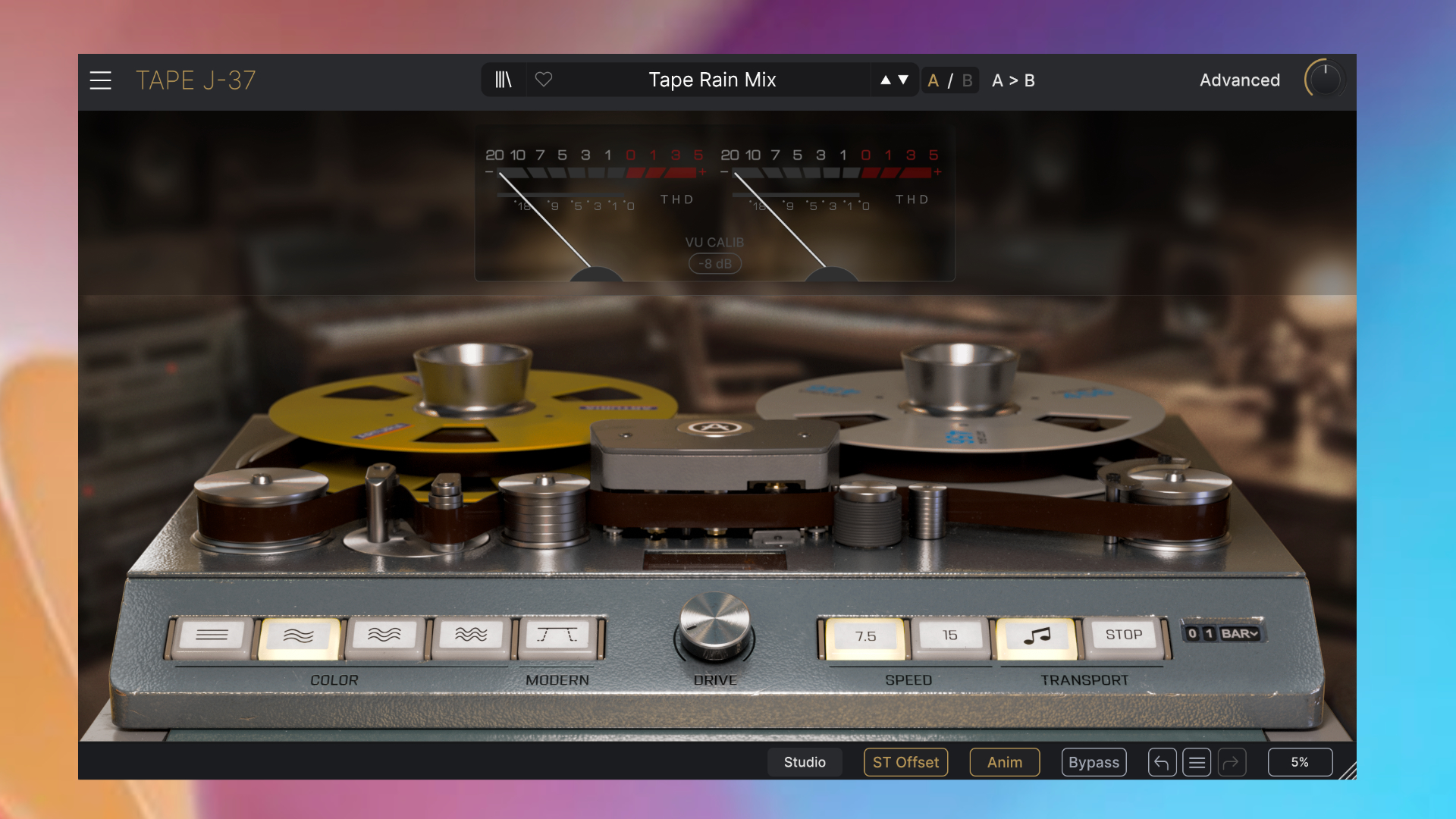
Positive is that in all four modes, the drive doesn’t overpower everything and still sounds very musical. I like it best in the middle position. On the right side of the very authentic interface is the speed switch, which offers a range of 7.5 to 15.
Both speeds give the J-37 a distinct tape sound. Lo-Fi and more of an analog simplicity at 7.5 and Hi-Fi at 15. If I have to choose, it’s mode 7.5 because it sounds more lovely to me. An excellent addition is the play/stop controls, which let you create realistic tape-stop effects with variable lengths.
At the bottom of the plugin, you can also activate a stereo offset function that simulates the natural channel dispersion of analog tape machines and slightly alters the left/right balance. The differences are very subtle, in my opinion.
Advanced Tapes
The Arturia TAPE J-37 plugin also features an advanced section, surprise, packed with little extras that enhance the entire tape experience. From left to right, you have a 3-band EQ with three EQ modes: pre, post, and emphasis.
Then you have a handy VU meter that provides real-time visualization of your signals. Next up are sound shapers. With the calibration section, you can set the wow/flutter effect and the tape hiss.

With the countless tape plugins released in recent years, I don’t need to preach to you about the capabilities of these tape ingredients. Yes, they sound great and are essential for this plugin.
That’s not all. The developers also added a delay loop with adjustable time, feedback, and offset, along with tweakable highpass and lowpass filters.
Sound Design/Exploring
Start the engine and let the tape do its work. Sure, you can use TAPE J-37 as a one-trick pony to vintageize and enhance your sounds. But it can do much more. It’s more of a tape multi-FX plugin, but without overwhelming the user with its interface.
It can beautifully enrich sounds with harmonics, using the dirtier tape colors or the built-in musical drive. Alternatively, you can use the tape hiss section to guide the sounds in a more broken direction.
Thanks to the built-in delay loop, you can create smooth tape-delay effects, especially at higher settings. The wow/flutter effect adds a subtle chorus-like movement to sounds.
TAPE J-37 is a great tape emulation with a lot of sonic flexibility that can certainly hold its own against the competition. I can’t say how authentic it is compared to the original. Bring me a Studer J37 and the necessary funds, and I will tell you.
New Mixing/Mastering Plugins
In previous versions, Arturia shifted its FX Collection towards a studio tools suite that includes not only transformation effects but also a wide range of mixing and mastering plugins. Among other things, it has classic and modern EQs, compressors, and more.
In the latest FX Collection 6, Arturia has added two more mixing/mastering tools: Bus Transient, a transient shaper, and MIX DRUMS, a drum processor developed in collaboration with Emre Ramazanoglu, an experienced mixing engineer.
Since mixing and mastering have never been my area of expertise, and never will be, I don’t want to open that can of worms here and say something that might be wrong. I’ll give you brief summaries of what both plugins can do, but I won’t go into detail.
Mix Drums & Buss Transient
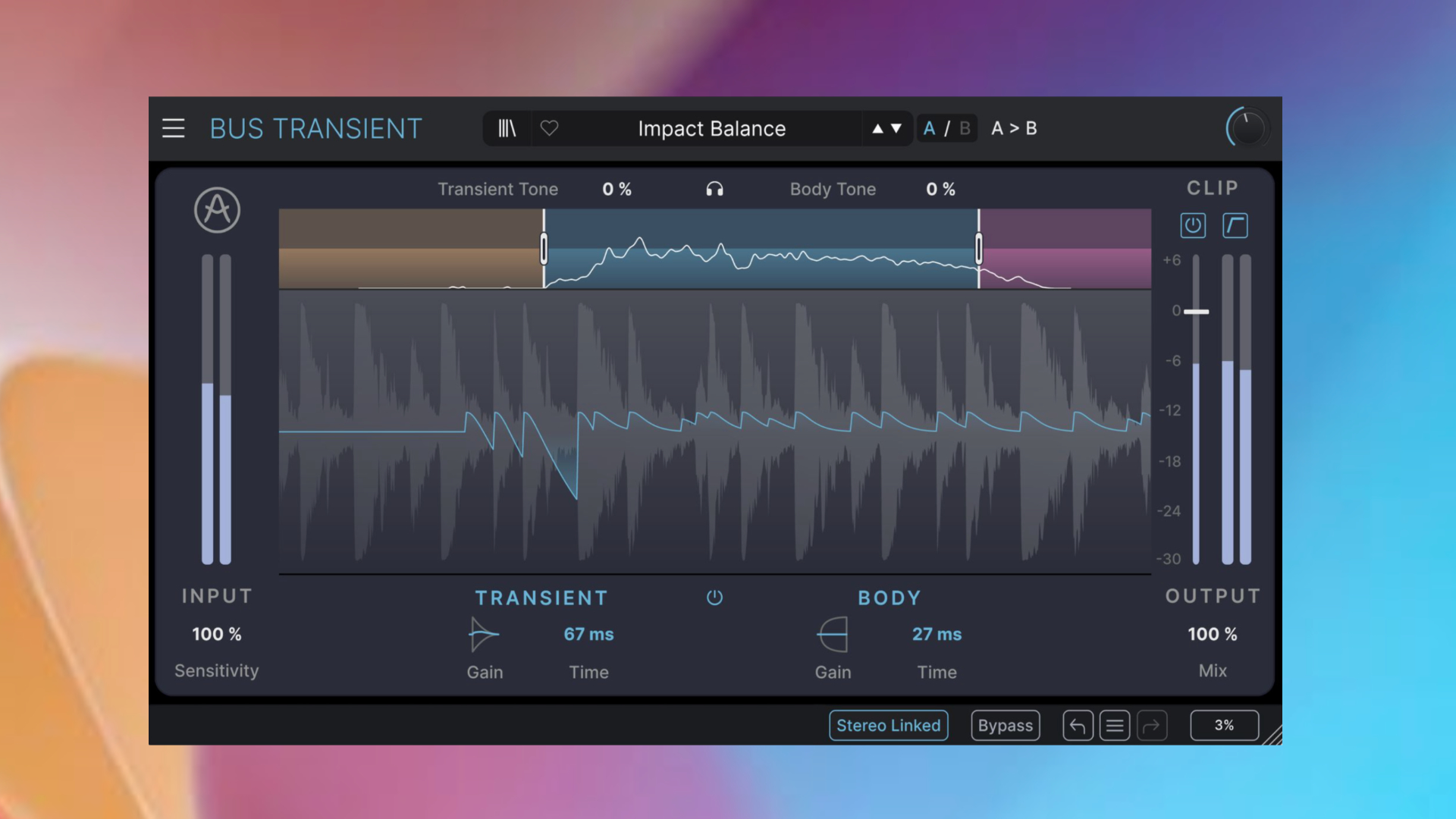
Bus Transient is a multiband transient plugin designed for precise control over the attack and sustain amounts of your sound. It offers up to three adjustable frequency bands with independent attack and sustain controls.
Each band can be shaped individually, allowing users to tighten drums, enhance punch, or extend sustain in a targeted way.
Additional features include a tone control for brightening or darkening the signal, an integrated clipper with soft and hard modes, and a dry/wet mix. Plus, there is a stereo option.
Mix DRUMS is a drum processor built around a dual-band concept, separating low frequencies (kick and toms) from mid/high frequencies (snare, cymbals, overheads). Each band offers dedicated tools for dynamics, saturation, transient shaping, and clipping.
The Low band focuses on punch and weight with op-amp style drive, while the Mid/High section adds character through tape and triode saturation options.
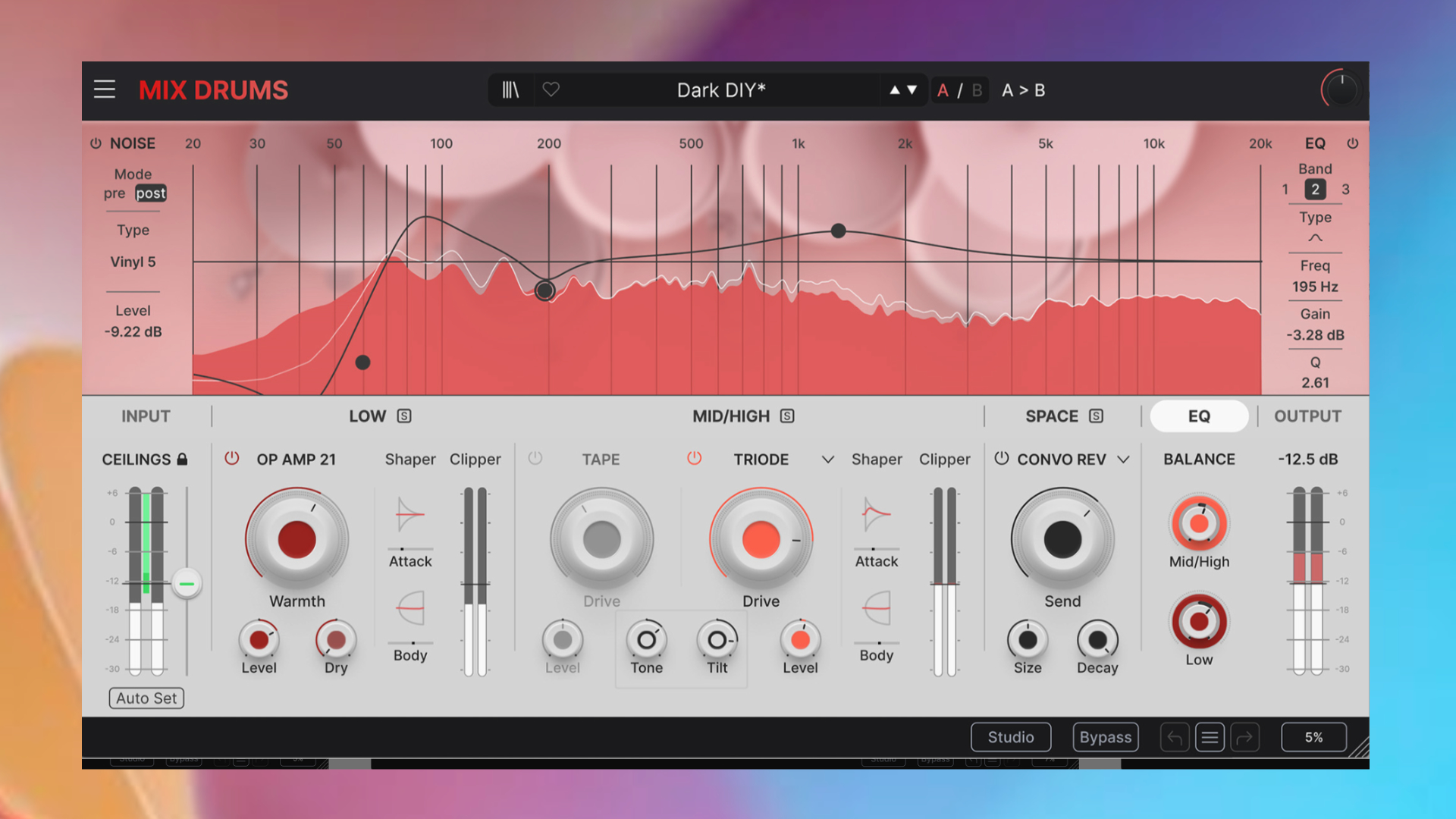
Also onboard is flexible filtering, a parallel mix control, and an automatic input ceiling for optimized gain staging. A Space section adds ambience via reverb and delay, while a 3-band EQ allows final tonal adjustments
Furthermore, you can also introduce subtle textures such as tape hiss or vinyl crackle with a noise generator. Two solid plugins that offer a wide range of possibilities for shaping sounds. However, I can’t judge how good they are or what might be missing, as mixing and mastering isn’t my field.
Lastly, FX Collection 6 also includes 134 new presets across 24 effects plugins, an updated browser with a faster engine, richer metadata, new preset comments, and a refreshed featured list. The latter offers a smoother, smarter search experience.
There are no updates for the existing 34 plugins. So, no new features or engine improvements, which is a shame.
Arturia FX Collection 6 Review Conclusion
Arturia’s effects plugin bundle is constantly growing. It now features 39 inspiring plugins, priced at 12,79€ each when purchasing the collection without any additional deals or cross-options. That’s a great-value package and probably one of the best on the market.
The new plugins are great additions, especially EFX Ambient, which adds an experimental, original touch to the bundle. They’ve broadened the bundle even further with the addition of two mixing/mastering plugins. Moving away from a pure FX Collection towards a comprehensive studio tools package.
After 39 plugins, one has to wonder where the journey leads. What can Arturia offer its customers in FX Collection 7, 8, 9…? More and more emulations, or will we eventually reach our limit? We’ll see.
All in all, the FX Collection 6 is a successful update. There isn’t one huge standout plugin to me, but it’s a quality continuation of the bundle.
Arturia FX Collection 6 Pro is available now for $499/499€. Existing FX Collection users can upgrade from their user account. FX Collection 6 Intro with 10 effects is out now for $99/99€.
The 39 sound processors run as a VST, VST3, AU, and AAX plugin on macOS (native Apple Silicon + Intel) and Windows.
More information here: Arturia
Be the first to comment