
Ableton Live 12.3 is now in public beta with new Stem Separation, Splice Integration, and major new Push 3 features like support for class-compliant audio interfaces.
Good news. Ableton Live 12.3 is out as a free download for existing Live 12 users.
Alongside this, Ableton also launched its Black Friday sale with 20% OFF on hardware and 25% OFF on software, including updates and upgrades. For example, you can get the Move for 399€ and the Push 3 Standalone for 1519€.
Available at my partners

Update from September 2, 2025
At the beginning of summer, Ableton released the Live 12.2 update with numerous new features and improvements.
Summer is coming to an end, and the next major update for Live 12 is already here: version 12.3, which is now in beta. And it’s a significant one, considering the features.
Ableton Live 12.3
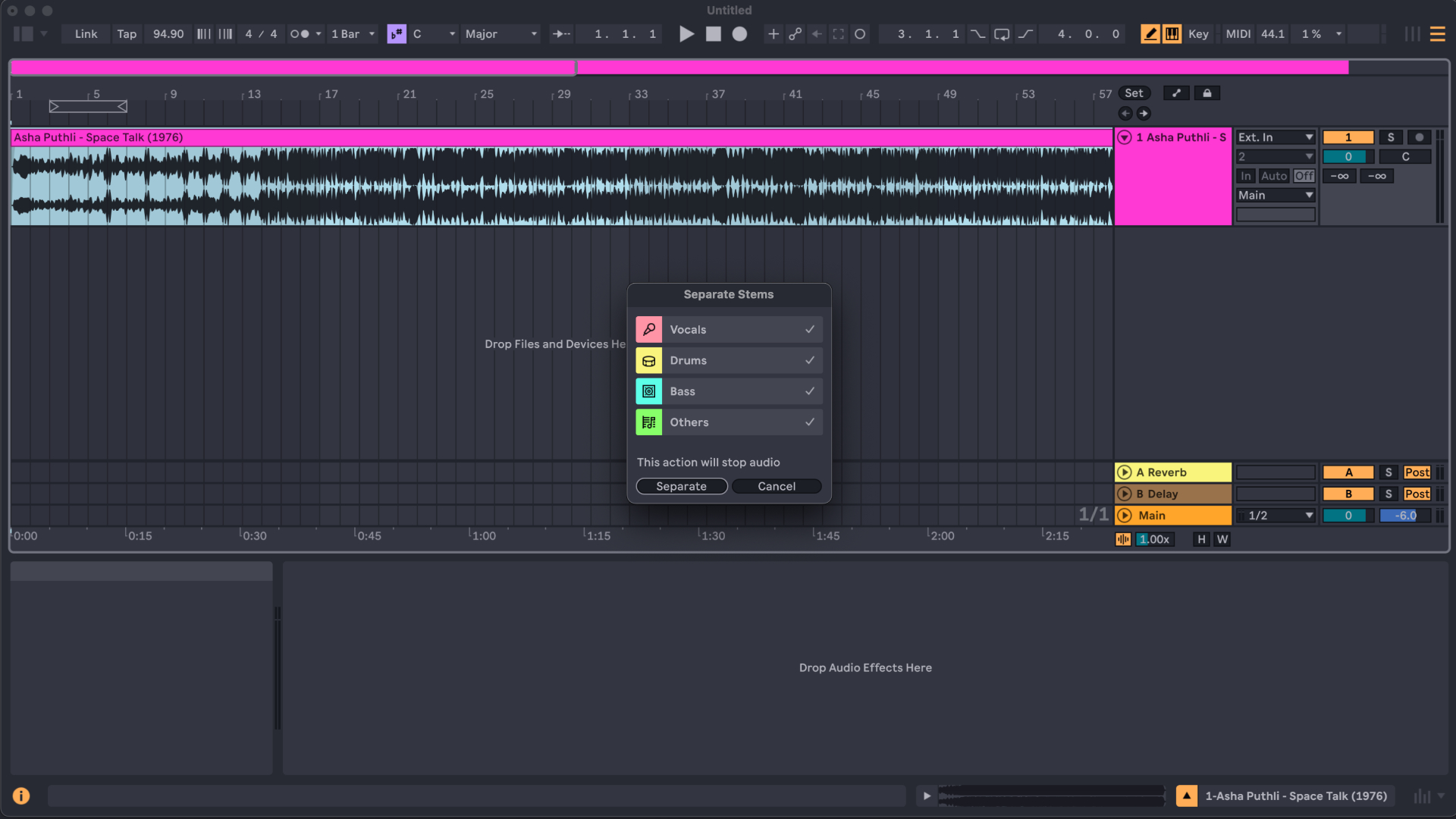
Live 12.3 is now available for download in the Beta Program. A highlight of the new update is the new Stem separation functionality for Live 12 Suite and Push 3 Standalone.
You can now split vocals, bass, drums, and other sounds from any audio clip in arrangement or session view, or in the browser, with just a couple of clicks. For this new modern feature, Ableton teams up with Music AI, the developers of Moises.
This definitely levels up the sampling work in Ableton Live but also the next major new feature.
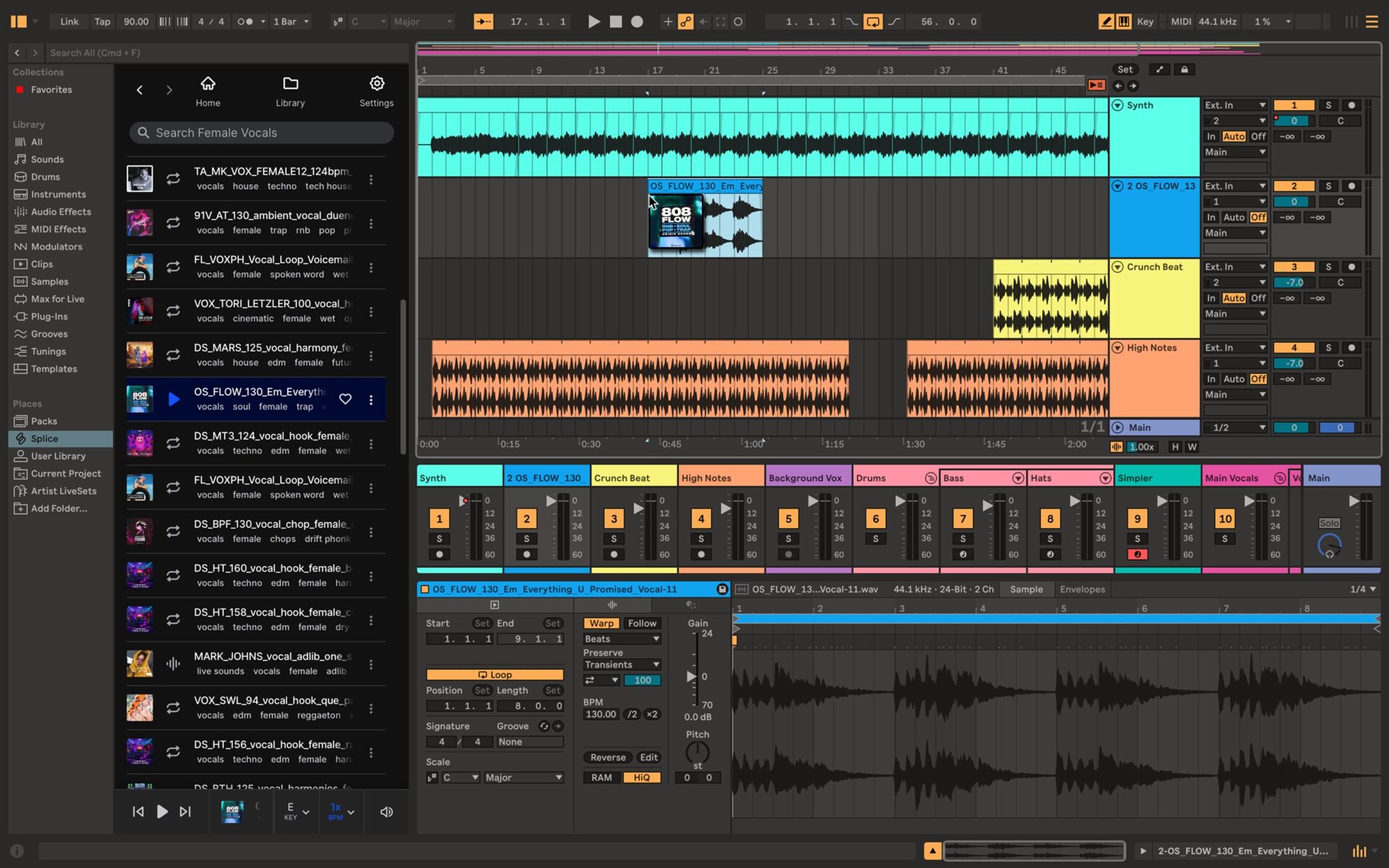
Then a surprise for me. Ableton Live 12.3 now has Splice integration, giving you direct access to Splice’s full library of sounds inside Live’s Browser. This is not free but requires an active subscription.
With the new Search with Sound feature, you can also capture audio from your project, or drag and drop a clip into the Splice panel, and Splice will find samples that fit the rhythms and harmonies of your track
The new Bounce to New Track feature from Live 12.2 is now being expanded again. With 12.3, you can now bounce an entire group track in place or just a portion of it, including all its processing, to a new audio track.
The all-new Paste Bounced Audio feature allows you to paste a copied clip or selection as bounced audio into any track or take lane.
Ableton Live 12.3 also introduces a new A/B feature for all built-in instruments, audio, and MIDI effects, allowing you to compare two parameter sets quickly. Indeed, a convenient new feature.

Additionally, it introduces an updated, reimagined Auto Pan-Tremo device, allowing you to add spatial movement or rhythmic dimensions to your tracks.
The device’s new tabbed layout lets you switch instantly between panning and tremolo effects, and each has deeper modulation controls and a wider range of time modes for greater rhythmic control. Nice, it’s now part of Ableton Move, Note, and Live Lite as well.
Ableton Live 12.3 also features new and improved packs, including the new Generators pack from Iftah. It includes new intuitive and immediately musical music tools for Live 12 Standard and Suite, like the beloved Sting acid bass pattern generator.
Live 12.2’s Expressive Chords Pack gets a new Chord Edit mode – letting you transpose selected chords, and even input your own with the ‘Learn’ function, while Live 12.1’s Sequencers Pack adds support for reproducible arrangements.
Push 3 Standalone Updates
Good news for the Ableton Push hardware users. There are also neat updates. Alongside the addition of Stemp separation, Bounce Groups, and the updated devices, the Push 3 hardware (MIDI and standalone) pads gain new expressive functionality.
The new XYZ layout transforms Push’s pads into an expressive touchscreen for your rack, instruments, and effects. It gives you a new intriguing way to control Ableton Live.

Slide your finger across Push’s pads to shape the sound in complex ways, and press to trigger punch-in effects – all while playing notes with the other hand.
Every device comes with bold, musical pre-mappings to get you started right away, but you can go deeper by creating racks and assigning your own custom macros.
On top of that, there is a new rhythmic generator drum rack layout that makes one of Live’s generative MIDI Tools playable on Push 3 and a new touch-sensitive step editing feature. The latter lets you adjust the velocity of notes individually or in bulk.
A highlight for me is that the new update brings full support for class-compliant audio interfaces to the Push 3 Standalone. This allows you to expand Push’s inputs and outputs, record using your interface’s mic preamp, perform live with DJ mixers, and more.
Note and Move Updates
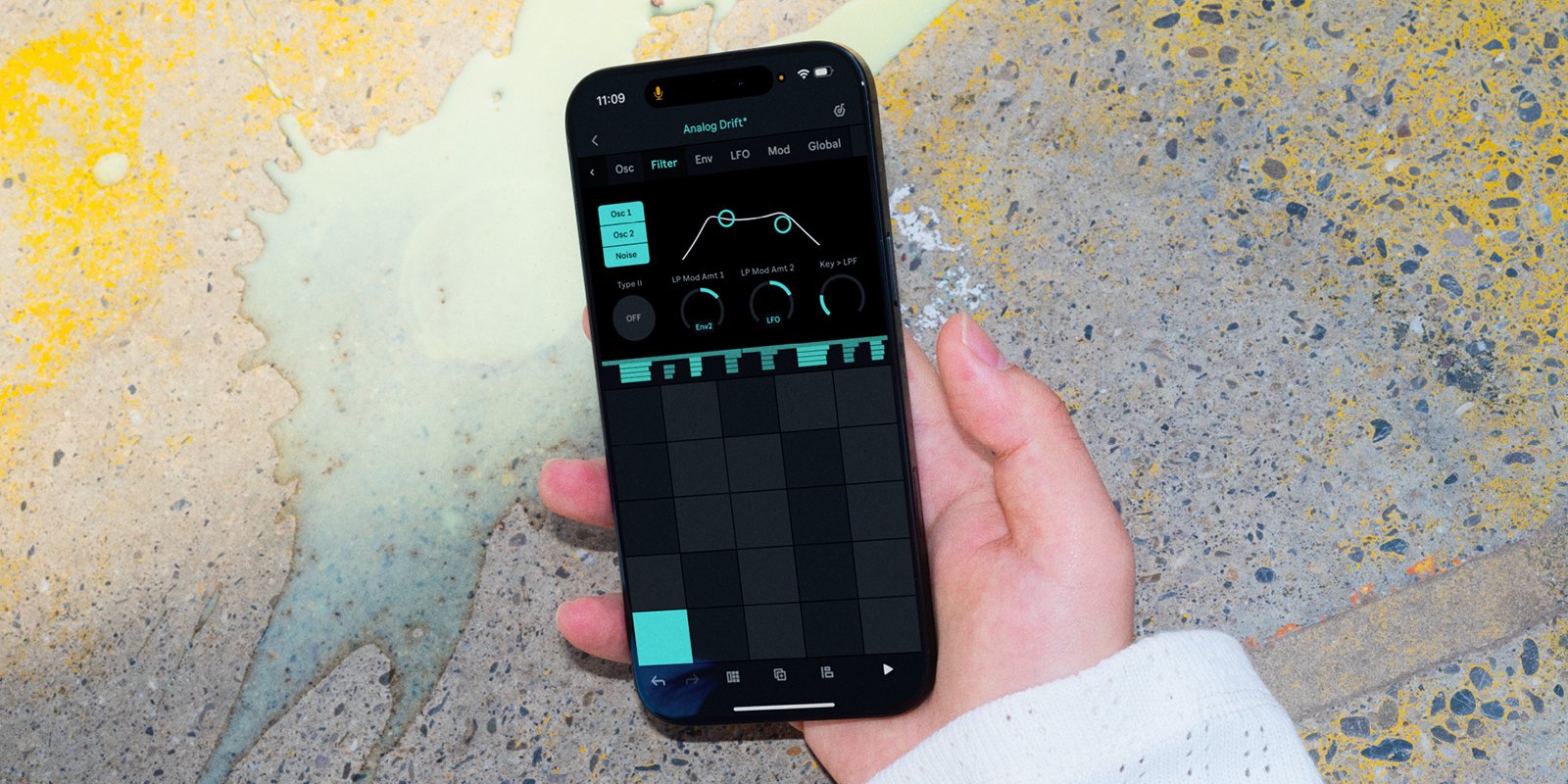
Also, Move hardware and Notes have just received new functionalities with the Live 12.3 update. The Ableton Note has just received update 1.5 with a new in-app purchase that unlocks all the parameters (oscillators, filters, envelopes…) of the Drift Synthesizer.
Users of the Move sketchbook hardware can now download update 1.6, bringing you the ability to reverse drum rack samples via the Sample Option menu. It also includes new Sliced Loop presets, including drum breaks, guitars, pianos and more to the Move library.
Plus, you can upload Move and Note sets to Move via the Move Manager.
Finally, there’s the news that Ableton hardware, namely Push 3, Push 3 Standalone, and Move, is now also available in Europe from Thomann. After being exclusively available from Ableton in Europe, the hardware is now also available for purchase in stores.
At first glance, this is a pleasant update that comes as a welcome surprise. I thought things would be quiet for a while after 12.2. Step separation, in particular, is a nice addition that many people will probably use.
The new Ableton Live 12.3 update is available in the beta program
More information here: Ableton
Available at my partner
Thomann
Update from June 4, 2025
Update: official release is planned for June 11, 2025.
Two years ago, on March 5, 2023, Ableton Live 12 was released. Now, Update 2.2 is in the starting blocks and already in beta.
The new update, 12.2, is a free update for existing Live 12 users and brings new handy features.

Ableton Live 12.2
One highlight is the new Bounce To New Track feature. Live now lets you bounce clips or time selections on any MIDI or audio track, including all processing, to a new audio track with just a few clicks – or use Bounce Track in Place to convert the whole track to audio.
A very useful feature, especially when you have resource-hungry projects and don’t have a very modern computer. It’s also applicable for sound design and converting that specific sound directly into audio instead of keeping a huge signal chain for a single sound.
Then, the new Live 12.2 update ships with new and updated devices. Expressive Chords is a new MPE Max For Live device that lets you play interesting progressions intuitively, one key or pad at a time. This works on Live and Push.

Meld, the MiniFreak-like synth device introduced in Live 12, now has a new chord oscillator and a scrambler LFO effect. Roads also benefit from a new routing mode, filter type, and external audio and MIDI sidechain.
Auto Filter has been completely redesigned with creative new filter types, real-time visualization, and a revamped modulation section. As a bonus, users of Ableton Move and Note can also use this effect.

In addition, Ableton Live 12.2 also improved the browsing experience with a new Quick Tags panel that lets view, edit, and assign tags directly in the Browser. The built-in filter view has got a makeover, and its hidden feature made more discoverable.
You can now customize the look of your labels and user folders, and the Browser lets you view multiple columns of metadata at once.
New Push Standalone Features
Ableton Push standalone also gets new features with Live 12.2. Expressive 16 Pitches lets you play samples in Drum Rack melodically and with added fine control from Push’s MPE-enabled pads.
Follow Actions is a new function with which you can structure songs, perform Sets, and explore flexible ways of sequencing clips and scenes. The new Bounce to New Track function is also available on Push. The same applies to the groove pool and Live 12’s tuning systems.
And in addition to Expressive Chords and the updates to Auto Filter, Meld, and Roar, Live 12.2 brings the External Audio Effect device to Push – enabling you to use hardware audio effects wherever you like in your Push Set.
It’s a nice update with some neat new features. Ableton Live 12.2 is now in beta, and once the testing period is over, the update will be a free download for existing Live 12 users.
Update From October 8, 2024
Alongside the new Move “sketchbook” hardware, Ableton has also published the free Live 12.1 update.
Update From July 3, 2024
Ableton Live 12 has been on the market for almost half a year now. I really like the new update. The new synth Meld and the new MIDI transformation tools are especially fun.
Good news for Live 12 users today. Ableton has released the free Live 12.1 update with additional features that are now in beta. Push 3 users also benefit from new goodies.

Ableton Live 12.1
Live 12.1 introduces auto-tagging, making finding the right sound in your user library easier. New tags are automatically assigned to all samples in the library less than a minute long. This also applies to VST3 and AU plugins. A nice extension for the new browser in Live 12.
The new update is very focused on devices. There are four devices news, two of them completely new and two redesigns.
Auto Shift is Live’s new pitch correction and harmonization device. It lets you manipulate and extract harmonies from vocals in real-time. Choose a scale for Auto Shift to follow, and play and make harmonies from any monophonic signal with the dedicated sidechain.
The results can vary greatly, from little correction to extreme robotic effects like”Cher.” It’s a creative FX and up to you how you use it in your project.
Then, a little surprise: there is a new drum sampler in Live 12.1. It’s a new compact sample player device designed for tweaking and enhancing drum sounds on the fly.
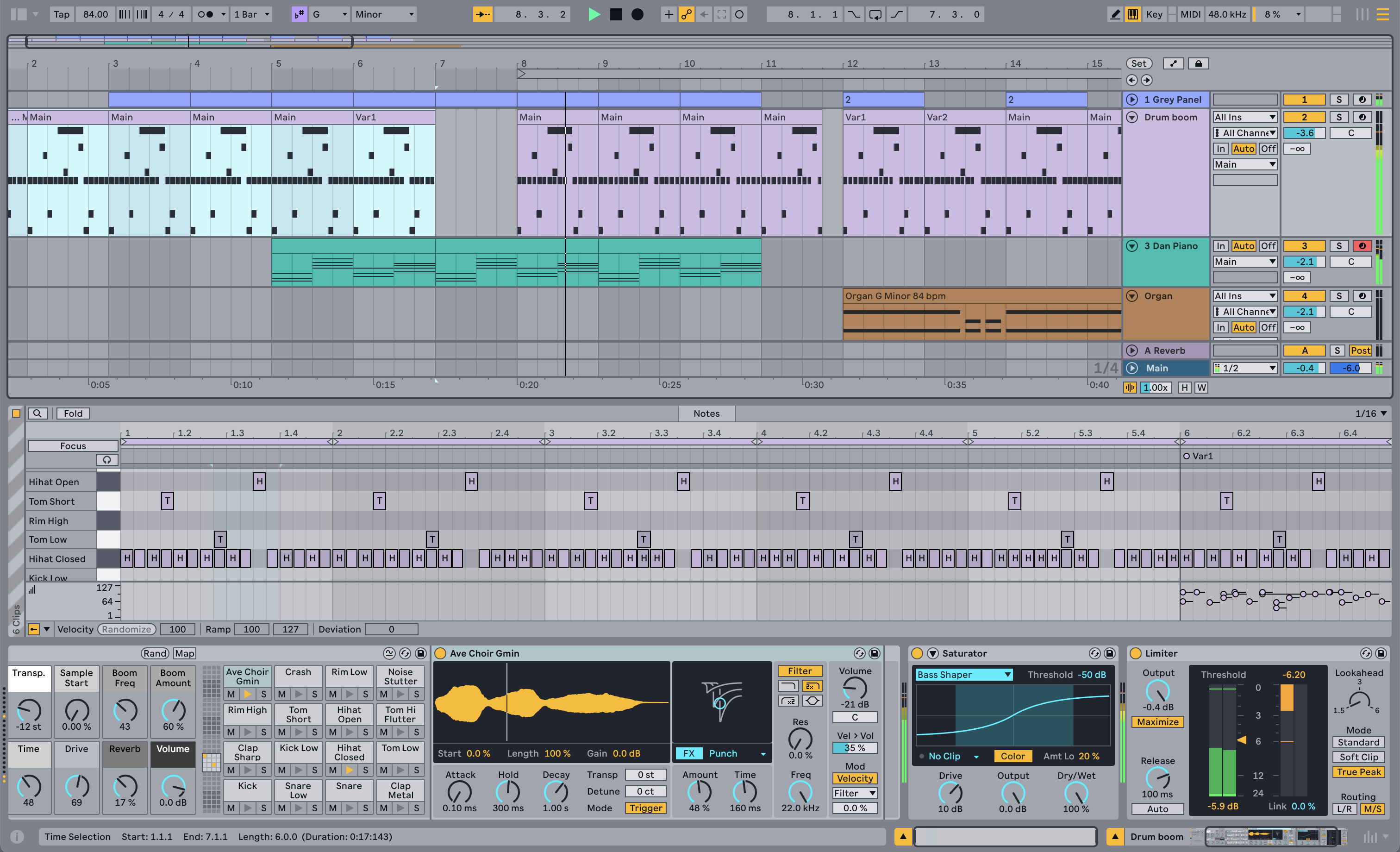
It offers various parameters, including one-shot mode with start, length, and gain for the sample and attack, hold, and decay for the built-in envelope. It also includes a filter and a built-in effects processor—certainly not a game-changing device, but a useful one that speeds up the workflow with drum sounds.
Besides this, the Limiter and Saturator received new designs and improved specs (smoother release envelopes for the Limiter, hard clipping for the Saturator…). That’s not all. The MIDI editor now allows you to filter and select notes by time, pitch, or other criteria.
Also part of the new Live 12.1 update are Glissando and LFO, two new MPE-specific MIDI transformation tools. They let you create curves for the MPE parameters of selected notes. Not to forget, there are also many improvements:
- chop MIDI in new ways:
- envelope follower now hosts a sidechain option
- and more
Push 2+3 Computer/Push 3 Standalone & Live 12.1
Not only Live 12 but also the Push 2/3 have received new features. On Push 2 and 3, you can now map macros and experiment with macro variations. Further, you can organize sets more easily and take advantage of Live 12’s browser filters.
Another new feature for the Push 3 is the ability to add groove instantly to all the MIDI clips in your set with a single twist on an encoder. Lastly, Push 3 standalone adopts Live’s new sample auto-tagging feature.
An excellent update for Live 12.
Update From February 22, 2024
We have an official release date for Ableton Live 12. After a long beta test, the new version of the Berlin digital audio workstation will be released on March 5, 2024, to the public.
Until then, you can still benefit from a 20% OFF discount on a purchase of Live 11 with a free update to 12.
Article From November 14, 2023
I want to write: Does Ableton now publish Live updates every year? Nope. Ableton Live 11 was announced in November 2020 and released in February 2021. Ouch, how quickly time has passed. It felt like it was 2022. There is a reason why I introduced you this way in my article.
Ableton announced Live 12 today, a new version of their popular DAW with major new features, improvements, content, and more. Here’s a detailed overview of what’s new.
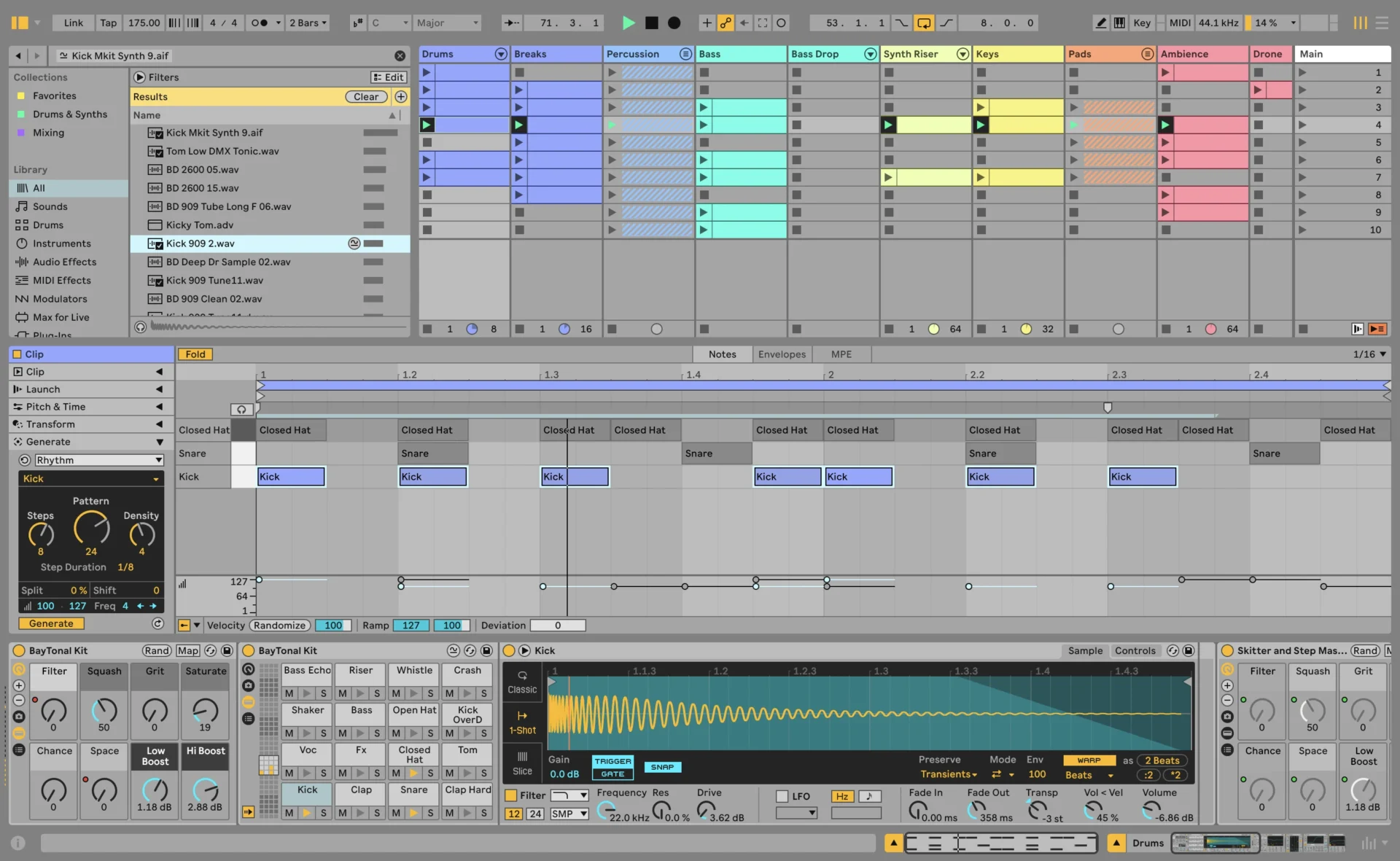
Ableton Live 12
Live remains Live also in version 12. It’s not a revolution but an evolution of Ableton’s DAW. There are no new mega headlining features this time, like in Live 11 comping or MPE. This time is more about smaller features that turn Live into a more accessible, creative digital audio workstation.
When you open Live 12 for the first time, you see a new user interface. Still a familiar picture, though, but the team has created a cleaner and more modern look for it.
It removes visual complexity and keeps the focus on your music, says Ableton. For me, it seems more melted together, less in recognizable blocks like Live 10 or 11.
An Endless Playground For Ideas
Audio manipulation using effects… is an absolute standard in every DAW. MIDI manipulation, on the other hand, is a topic that DAW developers have only been exploring in more depth for several years. For example, Ableton introduced probability (chance) to its sequencer in Live 11.
They continue this MIDI focus consistently in Live 12 with new MIDI transformation and generator tools. With these, you can turn any simple MIDI sequence into a deeper and more complex variation.
You can add ornaments, connect successive notes and chords, and simulate guitar strums. Live 12 also hosts a set of inspiring, fully customizable generative algorithms that create melodies, rhythms, and chords. Often seen as a plugin or M4L device, now embedded in Live.

Ableton also updated the MIDI editor with new functions and a better workflow, including the option to rearrange the order of a selection of notes by pitch, velocity, or duration. You can also stretch, split, chop, or join notes in new ways, shape the velocity of notes more easily, and more.
The team also found an answer to the question: “are my tracks in the right key?” Live 12 includes a new function allowing you to choose a key and scale in the control bar to stay in key across all devices.
A scale guide is built into the clip editor, allowing you to transform, sync, or generate new ideas. On top, it comes with new tuning systems for working outside the 12-tone equal temperament system, all accessible in the Live’s devices.
The first part of the Live 12 update is very MIDI-heavy and opens up many new possibilities for crafting ideas. Live 12 also has some new exciting devices.

New Synths, Effects, and Content
Then, Live 12 introduces three new devices, one of which is almost legendary.
The first new addition is Meld, a bi-timbral MicroFreak-like MPE Synthesizer powered by two easy-to-use macro multi-synthesis oscillators. It also has a noise generator, dual-mode filter section, various LFOs, envelopes, and more. Just like in wavetables, you can expand it and work with a deep modulation matrix.
Let’s stay with instruments. Robert Henke’s almost legendary Granulator device has also received a major update. Now integrated into Live 12 as Granulator III with MPE support for expressive control over parameters. A big plus, you can now capture audio in real-time and are no longer forced to import it.

Another powerful new device is Roar. It’s a creative distortion device with various types. They range from more subtle ones like soft sine, diode clipper, or tube pre-amp for adding warmth, to crazy ones like noise injection, shards, or fractal.
Roar consists of three saturation stages that can run in series or parallel. Do you need more control? No problem. You can also work in mid/side and multiband configurations, giving you full control over your distorted timbres. And you get to go even deeper using the built-in modulation matrix.
There is also a new performance pack featuring four new Max For Live devices from sound designer and developer Iftah (ex skinnerbox). Made for capturing snapshots of your sets, creating micro-performances with multi-layered automation, loops in arrangements, and more.
It also ships with a new Lost and Found collection with sound sounds created from unusual materials, percussive trinkets, and more.

Workflow Improvements
Live 12 users can benefit from many workflow improvements. The Ableton developers have added a new stacked detail view. This gives you an overview of everything a track is doing at a glance. This is intended to avoid constantly switching between views and let you focus more on the track.
Further, Live’s built-in mixer is now also available in the arrangement view. Finally, it also comes with improvements, making it more accurate and easier to read and control.
Handy is the new tagging functionality in the browser. Use the included tags or custom ones to search for sounds without the constraints of the browser’s built-in categories. Very good if you are looking for a sound quickly. I’ve never been a big fan of the browser in Live, but this looks like a good upgrade.

Also neat is the new sound similarity search. You can take a sample and tell Live’s browser to find comparable sounds and instrument presets related to timbre. This saves you a lot of time and I’m excited to see how well it works.
Finally, Live 12 ships with accessibility and navigation improvements. Control core workflows in Live 12 using assistive technologies like screen readers, and use new keyboard shortcuts to navigate to nearly every part of Live.
First Impression
At first glance, a very exciting update. As said at the beginning: no revolution and no features that can now be used as headliners. The stars of the 12 update are the smaller add-ons that trigger inspiration or make the workflow smarter. Including the new MIDI manipulators or key and scale functionality.
I’m pleased about the update to Robert Henke’s Granulator device. I am a huge fan of this device and the new live sampling ability is a feature I’ve been waiting for a long time.
Availability
Ableton Live 12 will be available in Q1 2024. It will cost $99/79€ for Live Intro, $439/279€ for Live Standard, and $749/599€ for Live Suite. A discount offer is running from now until the release of Live 12.
During the promotion, all new Live 11 editions are 20% off as well as the Push 3. Purchasing any new Live 11 edition automatically entitles customers to a free upgrade to its corresponding Live 12 edition upon release.
Existing users can log in to their user account and check their upgrade price. From Live 11 Suite to Live 12 Suite, it’s currently 159€ instead of 199€.
More information here: Ableton
Available at my partner

Mixer in arrangement view FINALLY
MIDI tools look great as does the similar sounds search
Hope they make it possible to route from one midi track to several other midi tracks on different channels.
There is a work-around for that – put an External Instrument on the MIDI track you want to send MIDI from and choose your destination in the ‘MIDI To’ dropdown. Add multiple ones by creating extra chains in a group.
I do this to trigger sidechains from my kick drums.
Hope that helps!
Nice update but… Since Live 10 (2018), one of the most requested features on Ableton’s Centercode is ARA2 integration. 6 years later, still nothing… and still no bounce in place… WTF!?
Same for Bitwig: also requested but not implemented
Hello
At the moment, for existing users, the upgrade from Live 11 Suite to Live 12 Suite is 159 euros on Ableton site (not 149 euros as printed in the news).
Regards
Is there a deal to buy it at 149 euros ?
Thank you
Not that I know
I have Live 10.1 in Mac and I am thinking to downgrade to Live 8.
Too much CPU consuming.
Old Mac, you know.
I think today in 2024 anyone can create absolute good music in 2016 software terms.
Nowadays is crazy the rythm of new versions just to do aproximately the same.
Opinion from someone who has not cash to keep up with companies.
J.
The lack of bounce-in-place is really quite puzzling. Much of my workflow in Ableton is just routing MIDI tracks to audio tracks for rendering in real time (which I find less odious than waiting the perplexingly long period of processing time it takes to freeze and then commit a track). This is one of the many Ableton limitations driving my shift to Cubase these days.
you have mail!
oh! thanks, abelton!
bitwig is best thing to happen to ableton live in many years
forcing them to actually compete again
Got the Push 3 Upgrade kit for $680. Thought long and hard between getting this or a Macbook Air M4 for $750… aaaaaand decided for the upgrade kit to get my face out of the screen and focus on hardware only.
to get your face on another screen 🙂